Introduction
Modern AI-generated portrait photography has evolved beyond traditional single-frame compositions, allowing creators to tell complete visual stories within one image. One of the most compelling styles is the Cinematic Urban Night Diptych Portrait Prompt, a concept inspired by independent films, analog photography, and contemporary editorial fashion. By dividing the composition into two connected frames, this prompt creates a cinematic narrative that feels emotional, nostalgic, and visually powerful.
"Cinematic Urban Night Diptych Portrait Prompt"
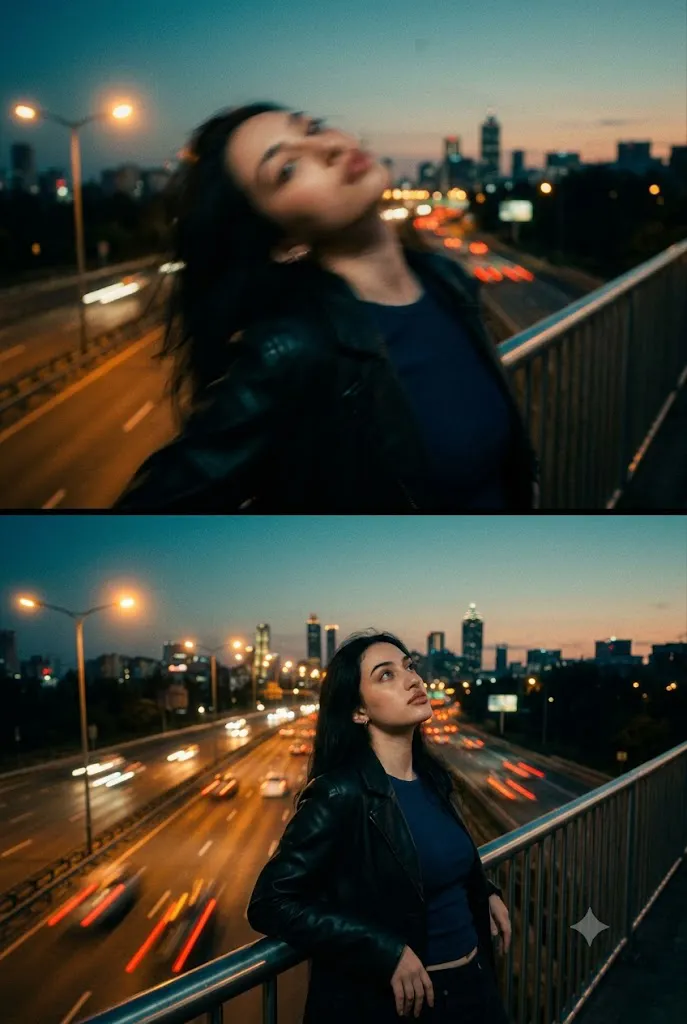
Create a cinematic vertical diptych portrait using the uploaded reference image strictly for facial identity. Preserve the face exactly without alteration. The top frame shows a soft motion-blur portrait of the same woman with her head gently tilted back, intentionally out of focus to evoke nostalgia and dreamlike emotion. The bottom frame presents a sharp medium shot of her leaning against a bridge railing while gazing upward into the night sky. She wears a dark blue top beneath a black leather jacket with naturally flowing brunette hair. Behind her stretches a glowing multi-lane highway leading toward a modern city skyline beneath a teal-and-orange twilight sky. Apply Kodak Portra 400 color grading, visible 35mm film grain, cinematic bokeh, analog photography aesthetics, dramatic teal and amber lighting, high contrast, shallow depth of field, ultra-realistic textures, editorial composition, and 8K resolution.
The diptych format presents two different moments of the same character. The upper frame captures an intentionally blurred, dreamlike portrait filled with motion and uncertainty. The woman's head is gently tilted back, slightly out of focus, evoking the sensation of fading memories, fleeting emotions, or late-night reflections. Instead of emphasizing sharp detail, this section communicates atmosphere and mood through soft motion blur and abstract visual language.
The lower frame contrasts dramatically with the first. Here, the same woman appears crystal clear, leaning quietly against a bridge railing while gazing upward toward the night sky. Her expression is thoughtful and introspective, creating a quiet emotional connection with the viewer. Wearing a dark blue top beneath a black leather jacket, she blends naturally into the cinematic city environment.
Behind her stretches a glowing multi-lane highway leading toward a distant skyline illuminated by countless city lights. Warm amber streetlights, long-exposure car headlights, and a deep teal-and-orange twilight sky create a classic urban cinematic color palette inspired by modern feature films.
A significant feature of this prompt is preserving the subject's facial identity. The uploaded reference image should be used only to maintain the exact facial structure, proportions, skin tone, and natural expression. The hairstyle, wardrobe, environment, and lighting can change, but the face should remain completely recognizable.
To complete the nostalgic atmosphere, the prompt incorporates a Kodak Portra 400-inspired color profile, visible 35mm film grain, soft analog imperfections, creamy bokeh, and balanced cinematic contrast. The final result resembles a carefully composed frame from an independent film rather than a digitally generated portrait.
Whether you're creating editorial photography, AI artwork, cinematic posters, or storytelling-focused social media content, this prompt offers an excellent balance of realism, emotion, and artistic composition.
How To Use Photo Editing?
Although AI image generators can produce remarkable results, thoughtful post-processing helps transform a good image into a convincing cinematic masterpiece. The objective is to preserve realism while enhancing the analog film aesthetic.
Begin by balancing the exposure. Night photography should contain rich shadows without losing important facial details. Protect highlights around streetlights and car headlights while maintaining visibility throughout darker areas.
Next, establish the signature teal-and-orange color grading. Cool teal tones should dominate the shadows, highway, and evening sky, while warm amber lighting naturally illuminates the streetlights and subtle skin highlights.
Introduce authentic 35mm film grain across the entire image. The grain should remain visible but fine enough to preserve facial clarity. Unlike digital noise, analog grain appears organic and enhances the nostalgic mood.
Increase local contrast selectively around the lower portrait while allowing the upper blurred frame to remain soft and atmospheric. This reinforces the narrative difference between memory and reality.
Background bokeh should remain smooth and natural. Enhance glowing city lights without introducing excessive bloom or unrealistic lens effects.
Preserve realistic skin texture throughout editing. Avoid aggressive smoothing or heavy beauty filters. Natural pores and subtle facial details strengthen the photorealistic appearance.
Finally, ensure both frames share consistent color grading. Although their sharpness differs intentionally, they should still feel like two connected moments captured within the same cinematic sequence.
Tools You Can Use For Prompt Copy and Create Photo
Professional cinematic portraits are easiest to create when combining advanced AI image generation with professional editing software.
AI Image Generation Tools
ChatGPT
ChatGPT is excellent for writing highly descriptive prompts that specify lighting, composition, identity preservation, camera characteristics, and storytelling details.
Midjourney
Midjourney excels at cinematic compositions, dramatic lighting, and artistic urban environments.
Leonardo AI
Leonardo AI creates highly realistic portraits with excellent facial consistency and environmental detail.
Ideogram
Ideogram performs well for editorial compositions and poster-inspired artwork.
Adobe Firefly
Adobe Firefly integrates AI image generation into professional creative workflows while maintaining impressive realism.
Photo Editing Software
Adobe Photoshop
Ideal for advanced color grading, diptych composition, motion blur refinement, and film effects.
Adobe Lightroom
Perfect for exposure balancing, cinematic color grading, highlight recovery, and tonal adjustments.
Capture One
Offers outstanding skin-tone rendering and advanced color control for professional portraits.
Affinity Photo
Provides powerful editing tools suitable for cinematic image finishing.
Snapseed
An excellent mobile editing application for adjusting exposure, grain, and contrast quickly
How To Edit Photo?
Step 1: Generate the Base Diptych
Create both frames simultaneously while preserving complete facial identity.
Step 2: Balance Exposure
Adjust highlights and shadows to create realistic urban night lighting.
Step 3: Apply Teal-and-Orange Color Grading
Introduce cool shadows and warm streetlight highlights for cinematic depth.
Step 4: Refine Motion Blur
Maintain believable blur in the upper frame while preserving realism.
Step 5: Sharpen the Lower Portrait
Ensure the lower frame remains crisp with excellent facial detail.
Step 6: Add Film Grain
Overlay fine analog grain consistently across both frames.
Step 7: Improve Background Lighting
Enhance glowing streetlights, traffic streaks, and city illumination naturally.
Step 8: Preserve Facial Identity
Avoid changing facial proportions, skin tone, expression, or recognizable features.
Step 9: Enhance Bokeh
Create soft, creamy city-light blur without overwhelming the composition.
Step 10: Final Color Balance
Ensure both frames share identical cinematic grading while maintaining their unique visual character.
Step 11: Fine-Tune Contrast
Deepen blacks slightly while preserving detail throughout the shadows.
Step 12: Export in High Resolution
Save the final artwork as PNG or TIFF for maximum image quality.
Conclusion
The Cinematic Urban Night Diptych Portrait Prompt transforms a traditional portrait into a compelling visual narrative by presenting two emotionally connected moments within one cinematic composition. The contrast between the dreamlike upper frame and the sharply focused lower portrait creates depth, storytelling, and emotional resonance that single-frame images often cannot achieve.
Inspired by independent cinema, analog film photography, and editorial fashion, this prompt combines realistic facial preservation with atmospheric lighting, rich urban environments, and timeless Kodak Portra-inspired color grading. The addition of visible 35mm grain, teal-and-orange lighting, and subtle motion blur further strengthens the nostalgic, film-like quality of the final image.
Modern AI image-generation tools make it easier than ever to produce sophisticated cinematic portraits, but exceptional results still depend on carefully crafted prompts and thoughtful post-processing. Attention to lighting, color harmony, composition, and authentic textures helps transform an AI-generated image into artwork that feels emotionally engaging and professionally produced.
Whether you're creating portfolio pieces, editorial campaigns, cinematic posters, storytelling projects, or social media content inspired by modern film aesthetics, the Cinematic Urban Night Diptych Portrait Prompt offers a versatile and visually striking approach to portrait photography. By blending realism with narrative design, it delivers images that are both technically impressive and emotionally memorable.