Introduction
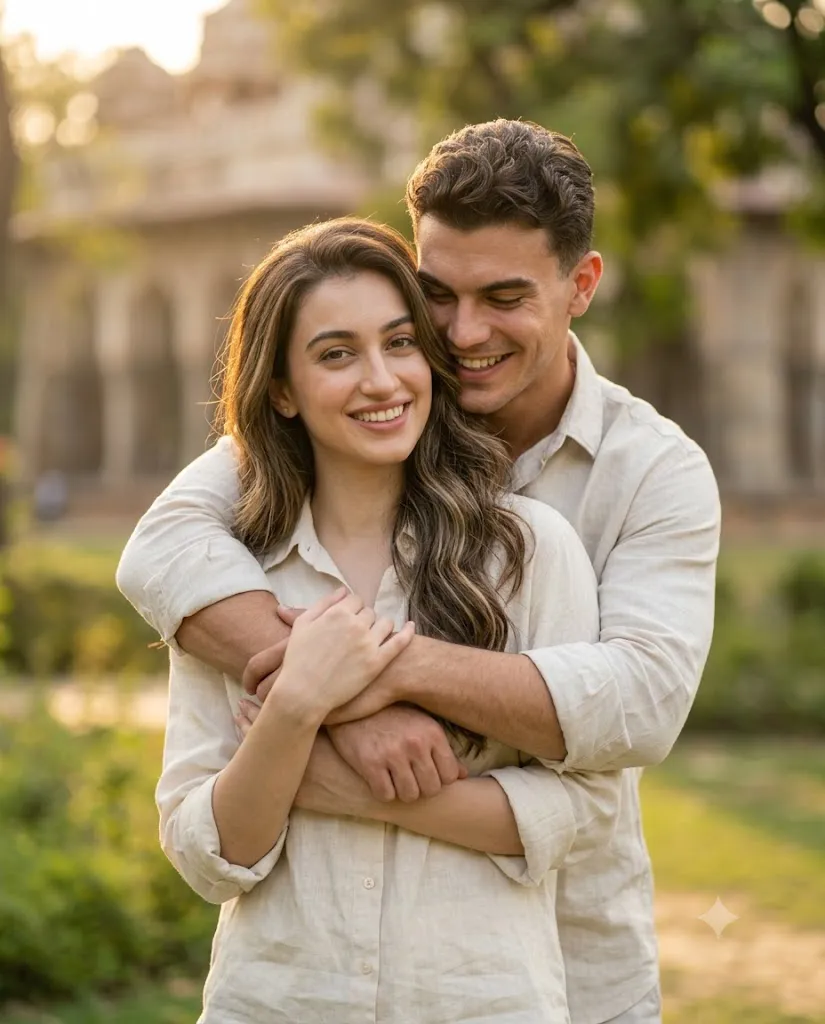
The Cinematic Romantic Couple Hug Portrait Prompt is designed to create a warm, emotional, and photorealistic portrait that celebrates affection through simple, natural interaction. Rather than relying on dramatic poses or elaborate settings, this prompt focuses on genuine emotion—a comforting embrace, authentic smiles, and soft natural light that together create an image full of warmth and intimacy.
"Cinematic Romantic Couple Hug Portrait Prompt"
Create a photorealistic vertical couple portrait using the uploaded selfie as the identity reference. Preserve the exact facial identity, skin tone, skin texture, face shape, eyes, eyebrows, nose, lips, jawline, hairline, and natural smile without beautification. Create a romantic composition where one person stands in front while the other wraps their arms around them from behind in a warm affectionate hug. Both smile naturally with genuine emotion. Capture the portrait using an 85mm portrait lens look with shallow depth of field, soft natural daylight, cinematic color grading, warm skin tones, neutral clothing colors, realistic skin texture, creamy background blur, and ultra-detailed 8K quality. No text or watermark.
This portrait style is inspired by modern lifestyle photography, luxury editorial campaigns, and romantic engagement sessions. The composition feels spontaneous, as though the moment was captured naturally rather than carefully staged. One person stands in front while the other gently wraps their arms around them from behind, creating a pose that communicates comfort, trust, and happiness.
The most important instruction within this prompt is complete facial identity preservation. The uploaded selfie should serve as the only identity reference. Every recognizable facial characteristic—including face shape, skin tone, skin texture, eyes, eyebrows, nose, lips, jawline, hairline, and natural smile—must remain exactly the same. The AI should never beautify, reshape, smooth excessively, or modify facial identity.
If the portrait represents two different people, separate reference images should be supplied for each individual to ensure both identities remain accurate. If only one selfie is intended to represent both subjects, the AI should use that single reference consistently while maintaining realistic facial proportions and expressions.
Lighting plays a central role in establishing the emotional atmosphere. Soft natural daylight gently illuminates both faces with flattering even exposure, eliminating harsh shadows while maintaining realistic skin tones.
The portrait is captured using the visual characteristics of an 85mm portrait lens, producing gentle compression and beautiful subject separation. A shallow depth of field creates creamy background blur while keeping both people perfectly sharp.
Neutral clothing colors, subtle cinematic grading, realistic skin detail, and low-contrast finishing create a timeless editorial appearance suitable for engagement portraits, anniversary photography, lifestyle branding, or treasured personal memories.
How To Use Photo Editing?
Professional editing enhances the romantic atmosphere while maintaining realism.
Begin by correcting exposure carefully so that highlights remain soft and facial details are preserved.
Adjust white balance toward slightly warm tones while maintaining natural skin color accuracy.
Preserve realistic skin texture for both individuals. Remove temporary blemishes only when necessary while retaining pores and natural facial features.
Refine hair detail by emphasizing individual strands without creating artificial sharpness.
Maintain soft neutral clothing colors while increasing subtle fabric texture.
Enhance background blur naturally without introducing unrealistic effects.
Finish with cinematic color grading and delicate analog-inspired film grain for a polished editorial appearance.
Tools You Can Use For Prompt Copy and Create Photo
Modern AI generators and editing software make creating realistic couple portraits significantly easier.
AI Image Generation Tools
ChatGPT
Excellent for creating detailed prompts that specify identity preservation, poses, camera settings, and lighting.
Midjourney
Produces beautiful cinematic romantic portraits with artistic styling.
Leonardo AI
Known for highly realistic faces and natural environmental rendering.
Ideogram
Suitable for lifestyle and editorial portrait creation.
Adobe Firefly
Provides AI image generation integrated with Adobe Creative Cloud.
Professional Editing Software
Adobe Photoshop
Ideal for portrait retouching, lighting adjustments, and finishing details.
Adobe Lightroom
Excellent for exposure balancing, color grading, and cinematic finishing.
Capture One
Offers industry-leading color accuracy and realistic skin rendering.
Affinity Photo
Provides powerful editing capabilities for portraits and environments.
Snapseed
A practical mobile editor for brightness, warmth, contrast, and selective adjustments.
How To Edit Photo?
Step 1: Upload the Reference Image
Provide the required reference image before generating the portrait. If two different identities are involved, upload one reference for each person.
Step 2: Generate the Base Portrait
Create the complete composition while preserving facial identity exactly.
Step 3: Correct Exposure
Balance bright highlights while maintaining detail across both faces.
Step 4: Preserve Skin Texture
Retouch minimally to maintain realistic pores and facial features.
Step 5: Refine Hair
Increase definition around individual hair strands while preserving softness.
Step 6: Enhance Clothing
Improve fabric texture while maintaining soft neutral colors.
Step 7: Refine Lighting
Balance warm daylight evenly across both subjects without creating harsh shadows.
Step 8: Apply Cinematic Color Grading
Introduce gentle warmth with slightly reduced contrast for a timeless editorial look.
Step 9: Add Fine Film Grain
Apply subtle analog-inspired grain for additional cinematic realism.
Step 10: Verify Facial Identity
Compare generated faces carefully with the uploaded reference images to ensure exact identity preservation.
Step 11: Final Refinements
Remove unwanted artifacts while preserving natural lighting transitions and realistic background blur.
Step 12: Export in High Resolution
Save the completed portrait as PNG or TIFF for maximum image quality suitable for albums, social media, or professional printing.
Conclusion
The Cinematic Romantic Couple Hug Portrait Prompt transforms a simple embrace into a timeless visual story filled with warmth, affection, and authenticity. By emphasizing natural expressions, soft daylight, realistic textures, and elegant composition, the portrait feels genuine rather than artificially staged.
The affectionate hug, comfortable body language, flattering 85mm perspective, shallow depth of field, warm cinematic grading, and preserved facial identity combine to create a portrait suitable for engagement photography, anniversary celebrations, family memories, editorial campaigns, and personal keepsakes.
Although AI image generation can quickly create impressive results, professional-quality portraits still depend on thoughtful prompt writing and careful editing. Maintaining exact facial identity, preserving realistic skin texture, balancing natural light, refining subtle colors, and applying tasteful cinematic finishing all contribute to producing believable and emotionally engaging portraits.
For the most accurate outcome, ensure that the correct reference image—or separate reference images if two different people are involved—is uploaded before image generation. Doing so allows the AI to maintain identity faithfully while creating a romantic portrait that captures genuine connection, beautiful lighting, and timeless emotional storytelling.