Introduction
Few portrait styles capture emotion, atmosphere, and visual storytelling as powerfully as a rain-soaked cinematic street portrait. Inspired by movie stills, neo-noir cinematography, and urban fashion editorials, the Cinematic Rain-Soaked City Street Portrait Prompt transforms a simple portrait into a dramatic scene filled with mood, depth, and narrative.
"Cinematic Rain-Soaked City Street Portrait Prompt"
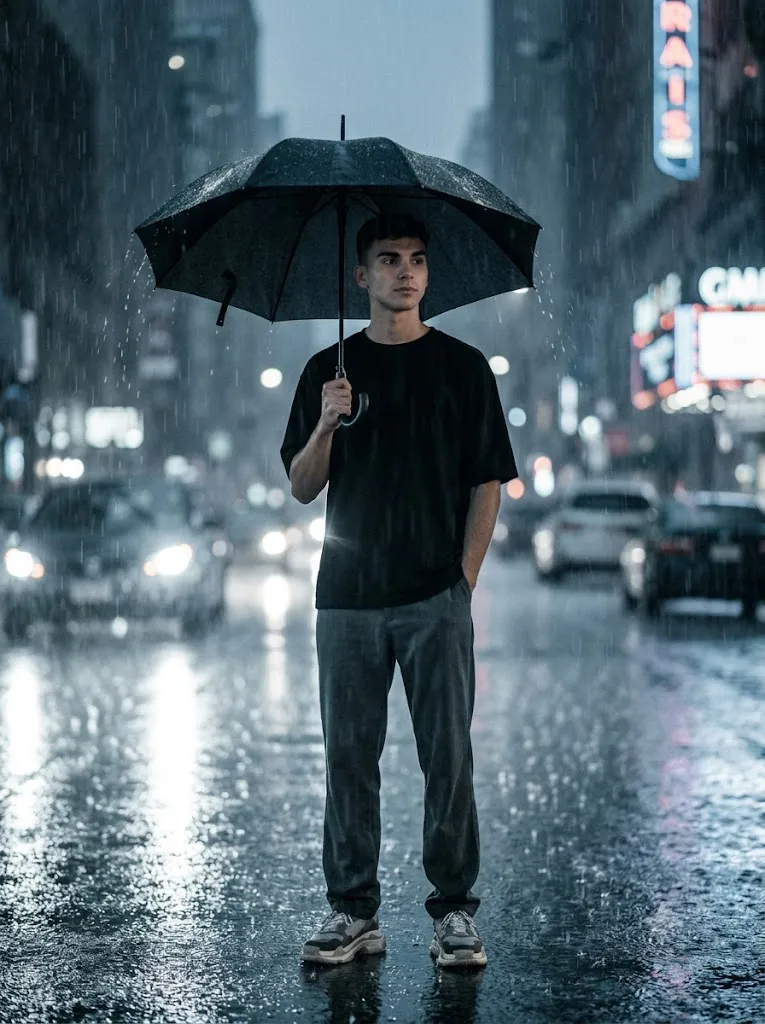
Use the reference image for 100% facial identity accuracy with no alteration to facial structure. Create a cinematic 3:4 vertical film-still portrait of a young man standing alone on a rain-soaked city street at night. Full-body composition, centered in the frame. He wears an oversized black T-shirt, relaxed dark grey baggy trousers, and chunky sneakers. He holds a black umbrella above his head while heavy rain falls around him. One hand grips the umbrella, the other rests casually near his pocket. Expression is calm, introspective, and slightly distant, looking off-camera. Wet asphalt reflects city lights beneath his feet. Background contains blurred headlights, streetlights, and urban bokeh. Soft backlight creates a halo around the umbrella and shoulders, while subtle side lighting defines facial features. Cool blue-grey color grading, cinematic contrast, shallow depth of field, film grain, realistic rain streaks, atmospheric haze, photorealistic skin texture, professional movie-still aesthetic, ultra-detailed 8K quality.
Imagine a lone young man standing in the center of a rain-drenched city street at night. Heavy rain falls around him while distant headlights and neon reflections shimmer across wet asphalt. He stands beneath a black umbrella, calm and composed despite the storm. His oversized black T-shirt, relaxed trousers, and casual posture create a modern urban aesthetic, while his thoughtful gaze suggests a deeper story beyond the frame.
What makes this portrait style so compelling is its emotional contrast. The environment is chaotic—rain pouring, traffic lights glowing, reflections dancing across the pavement—yet the subject remains still and self-assured. This balance between movement and stillness creates a timeless cinematic feeling often seen in high-end film productions and editorial photography.
Lighting plays a critical role in achieving this effect. Soft backlighting creates a halo around the umbrella and shoulders, while subtle side lighting reveals facial features without overpowering the moody atmosphere. Cool blue-grey color grading enhances the nighttime environment, and shallow depth of field separates the subject from blurred city lights in the background.
Today, AI image-generation tools make it possible to create stunning rain-soaked portraits with remarkable realism. However, the quality of the final image depends heavily on prompt construction, lighting descriptions, environmental details, and post-processing techniques. A carefully crafted prompt can generate an image that looks as if it were captured by a professional cinematographer during a major film production.
In this article, you will learn how to use photo editing to enhance cinematic portraits, discover the best tools for prompt creation and image generation, understand professional editing techniques, and master the workflow needed to create breathtaking Cinematic Rain-Soaked City Street Portraits.
How To Use Photo Editing?
Photo editing is one of the most important stages in creating a cinematic portrait. Even when AI generates a highly realistic image, editing helps refine the atmosphere, improve color consistency, and strengthen the storytelling impact.
The first area to focus on is exposure control. Rainy night scenes naturally contain both bright highlights and dark shadows. Proper exposure balancing ensures that streetlights remain realistic while preserving details in clothing, skin, and environmental reflections.
Color grading is essential for achieving a cinematic look. Most rain-soaked portraits benefit from cool blue-grey tones combined with subtle warm highlights from city lights. This contrast creates depth and enhances the emotional mood of the image.
Rain visibility can also be improved during editing. Increasing contrast selectively helps rain streaks stand out without making them appear artificial. Small adjustments to clarity can make water droplets more noticeable on the umbrella and clothing.
Skin retouching should remain natural. Cinematic portraits are most effective when realistic skin texture is preserved. Avoid excessive smoothing that removes pores and natural details.
The wet pavement often serves as a secondary focal point. Enhancing reflections can strengthen the cinematic atmosphere by adding depth and visual interest beneath the subject.
Film grain is another key element. A subtle layer of grain helps replicate the appearance of motion-picture film and adds authenticity to the image.
Finally, selective sharpening ensures that the face, umbrella, and clothing remain crisp while the background retains a soft, dreamy blur.
Tools You Can Use For Prompt Copy and Create Photo
Creating professional rain-soaked portraits becomes much easier when using high-quality AI generation and photo-editing software.
AI Image Generation Tools
ChatGPT
ChatGPT is excellent for creating detailed prompts that describe camera settings, lighting, clothing, emotional tone, and environmental details.
Midjourney
Midjourney produces stunning cinematic imagery with exceptional mood, lighting, and atmosphere.
Leonardo AI
Leonardo AI offers impressive realism and detailed environmental rendering for urban portrait scenes.
Ideogram
Ideogram performs well for fashion-oriented editorial photography and cinematic storytelling images.
Adobe Firefly
Adobe Firefly integrates AI image generation into Adobe’s professional creative ecosystem.
Professional Photo Editing Software
Adobe Photoshop
Photoshop provides advanced control over retouching, rain enhancement, compositing, and cinematic effects.
Adobe Lightroom
Lightroom is ideal for exposure adjustments, color grading, and overall image refinement.
Capture One
Capture One offers professional color management and exceptional image quality.
Snapseed
Snapseed is a powerful mobile editing application suitable for quick cinematic enhancements.
PicsArt
PicsArt provides creative filters, effects, and social-media-ready editing tools.
How To Edit Photo?
Step 1: Import the Portrait
Open the generated image in Lightroom, Photoshop, or your preferred editing software.
Step 2: Adjust Exposure
Balance highlights and shadows while maintaining nighttime realism.
Step 3: Refine Color Temperature
Introduce cool blue-grey tones while preserving natural skin tones.
Step 4: Enhance Rain Effects
Increase visibility of rain streaks using selective contrast adjustments.
Step 5: Improve Street Reflections
Enhance pavement reflections for additional depth and atmosphere.
Step 6: Add Cinematic Contrast
Increase tonal separation without crushing shadow detail.
Step 7: Sharpen the Subject
Focus sharpening on the eyes, umbrella, and clothing textures.
Step 8: Refine Background Bokeh
Keep city lights soft and visually appealing without distracting from the subject.
Step 9: Apply Filmic Color Grading
Use cool shadows and slightly warm highlights for a movie-like appearance.
Step 10: Add Atmospheric Haze
Introduce subtle haze around lights and rain for enhanced realism.
Step 11: Add Film Grain
Apply fine cinematic grain to replicate a professional film-still look.
Step 12: Export at High Resolution
Save the image in maximum quality for printing, portfolios, or social media use.
Conclusion
The Cinematic Rain-Soaked City Street Portrait Prompt is a perfect blend of fashion photography, emotional storytelling, and cinematic artistry. By combining dramatic weather, reflective city streets, atmospheric lighting, and a strong central subject, this style creates portraits that feel like scenes from a feature film.
The beauty of this concept lies in its ability to communicate emotion through environment. Heavy rainfall, glowing city lights, and quiet body language work together to create a powerful visual narrative. The subject appears resilient, thoughtful, and calm despite the storm surrounding him.
Achieving this look requires more than simply generating an image. Success comes from carefully describing lighting, camera perspective, clothing, atmosphere, and emotional tone within the prompt. Thoughtful editing further enhances realism and cinematic impact through color grading, sharpening, rain refinement, and film grain.
Whether you are an AI artist, photographer, content creator, filmmaker, or social media enthusiast, mastering the Cinematic Rain-Soaked City Street Portrait style can elevate your work dramatically. With the right tools, detailed prompts, and professional editing techniques, you can create breathtaking urban portraits that capture attention and tell unforgettable stories.