Introduction
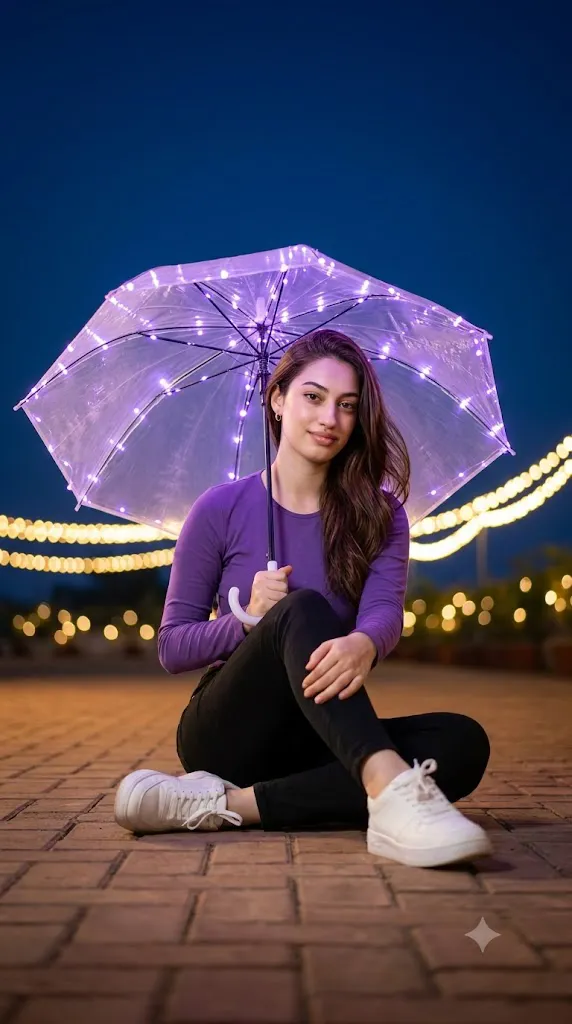
The Cinematic Purple LED Umbrella Night Portrait Prompt is a premium AI photography style that combines cinematic lighting, modern portrait photography, and creative night aesthetics into one stunning composition. Inspired by fashion editorials, movie stills, and professional DSLR photography, this style transforms an ordinary portrait into an eye-catching nighttime masterpiece with dramatic lighting and realistic details.
"Cinematic Purple LED Umbrella Night Portrait Prompt"
Create an ultra-realistic cinematic night portrait of a subject seated casually on a warm brick-paved ground. One leg is bent while the other extends naturally forward. Position the camera slightly low and close to the subject with a mild low-angle perspective, maintaining a clean full-body composition without cropping the head or feet. The subject holds a transparent umbrella decorated with small purple LED string lights that emit a soft lavender glow, creating subtle reflections on the umbrella while gently illuminating the face and hair. The other hand rests naturally on the knee. Dress the subject in a full-sleeve purple top, fitted black pants, and clean white sneakers with realistic fabric textures and natural folds. Hair flows naturally to one side as if moved by a soft breeze. The background features a deep blue night sky with minimal distractions and warm golden fairy lights forming strong creamy bokeh. Use balanced cinematic lighting with soft purple illumination from the umbrella, warm golden ambient reflections, and cool blue nighttime atmosphere. Capture the image using DSLR photography with a 50–85mm lens, shallow depth of field, HDR, photorealistic skin texture, ultra-detailed rendering, cinematic color grading, and premium editorial quality.
One of the defining features of this portrait style is the transparent umbrella decorated with glowing purple LED string lights. These delicate lights create a soft lavender glow that beautifully illuminates the subject's face, hair, and clothing while adding subtle reflections across the umbrella. Combined with warm golden bokeh lights in the distance and cool blue ambient lighting, the result is a balanced cinematic atmosphere full of depth and emotion.
Unlike traditional portrait photography, this aesthetic focuses heavily on storytelling through lighting, composition, and mood. The relaxed seated pose, natural smile, realistic fabric textures, and softly blurred background work together to create an image that feels calm, elegant, and professional. Every element contributes to a luxury editorial appearance suitable for magazines, social media campaigns, creative portfolios, and digital artwork.
Modern AI image generation makes it possible to create this complex lighting setup without expensive photography equipment. By writing a detailed prompt and using a high-quality reference image, AI can accurately recreate cinematic lighting, realistic skin textures, DSLR depth of field, and premium color grading.
This guide explains how to use AI photo editing, the best tools for generating cinematic portraits, an example prompt, and editing techniques that help achieve professional-quality results.
How To Use Photo Editing?
Creating a Cinematic Purple LED Umbrella Night Portrait begins with selecting a high-resolution reference image. A portrait with visible facial features, natural posture, and good lighting provides the best foundation for AI transformation.
AI photo editing relies on descriptive prompts. The more detailed your instructions are, the more accurately the AI understands the scene, lighting, clothing, background, and camera settings.
Step 1: Choose a High-Quality Portrait
Select a clear image with realistic facial details and a relaxed expression. Full-body portraits work best because they allow AI to recreate the complete pose and outfit.
Step 2: Write a Detailed Prompt
Your prompt should describe every important visual element, including:
- Transparent umbrella with purple LED lights
- Relaxed seated pose
- Purple outfit and white sneakers
- Night background
- Golden bokeh lighting
- Blue ambient atmosphere
- DSLR camera settings
- Cinematic color grading
- Photorealistic textures
A detailed prompt significantly improves the quality of the generated image.
Step 3: Upload the Reference Photo
Import your image into an AI image generator or image-to-image editing platform. The AI will preserve the facial identity while applying the requested cinematic transformation.
Step 4: Generate Multiple Variations
Create several outputs and compare lighting, pose, facial resemblance, reflections, and background quality.
Step 5: Choose the Best Version
Select the version with the most realistic lighting, natural skin texture, and balanced composition.
Step 6: Apply Final Adjustments
Use professional editing software to improve contrast, refine colors, remove artifacts, and enhance overall realism.
Combining AI generation with light manual editing creates a polished portrait suitable for professional presentation.
Tools You Can Use For Prompt Copy and Create Photo
Several AI image generators and editing applications are ideal for producing cinematic night portraits.
ChatGPT
Generate highly descriptive prompts covering camera settings, lighting, clothing, pose, composition, and artistic mood.
Midjourney
Produces beautiful cinematic portraits with rich lighting, dramatic color grading, and artistic depth.
Flux AI
Creates highly realistic portraits while preserving facial identity, natural expressions, and detailed textures.
Stable Diffusion
Provides advanced customization through image-to-image workflows, ControlNet, and prompt refinement for greater creative control.
GPT Image
Useful for generating premium-quality AI portraits that follow detailed instructions while maintaining realistic composition.
Adobe Photoshop
Perfect for refining AI-generated portraits through color correction, skin enhancement, lighting adjustments, and background cleanup.
Adobe Lightroom
Excellent for improving exposure, highlights, shadows, white balance, and cinematic color grading while maintaining realistic skin tones.
Canva
Helpful for creating social media graphics, posters, banners, wallpapers, and promotional designs using the completed portrait.
Using AI image generation together with professional editing software produces realistic cinematic portraits with exceptional quality.
How To Edit Photo?
Professional editing enhances the final portrait while preserving its natural cinematic appearance.
Improve Skin Texture
Maintain realistic pores and natural facial details. Avoid excessive smoothing to preserve a professional photography look.
Enhance Lighting
Increase the purple glow around the umbrella while balancing warm golden highlights and cool blue ambient tones.
Refine Color Grading
Apply cinematic contrast with deep blues, soft purples, and warm highlights to create a dramatic nighttime mood.
Sharpen Clothing Details
Enhance the textures of the clothing, umbrella, shoes, and brick pavement to improve realism.
Increase Background Depth
Strengthen the creamy bokeh effect while keeping the subject perfectly sharp to emphasize DSLR depth of field.
Perfect Composition
Ensure the entire body remains visible with balanced spacing and a clean editorial layout.
Export in High Resolution
Save the final image in 8K or the highest available resolution for portfolios, social media, posters, wallpapers, or print projects.
Conclusion
The Cinematic Purple LED Umbrella Night Portrait Prompt combines modern AI technology with cinematic photography techniques to create visually stunning night portraits. The blend of glowing purple LED lighting, realistic textures, balanced color grading, and professional DSLR composition results in images that resemble scenes from luxury fashion editorials and feature films.
Achieving the best results depends on writing a highly detailed prompt that clearly describes the lighting setup, pose, wardrobe, background, camera settings, and artistic mood. AI provides an excellent starting point, while professional editing refines the portrait into a polished final image.
Whether you are creating creative portfolios, fashion editorials, social media content, promotional artwork, or personal photography projects, this cinematic night portrait style offers endless creative possibilities. With thoughtful prompt writing and careful editing, you can consistently produce dramatic, elegant, and photorealistic portraits that leave a lasting visual impression.