Introduction
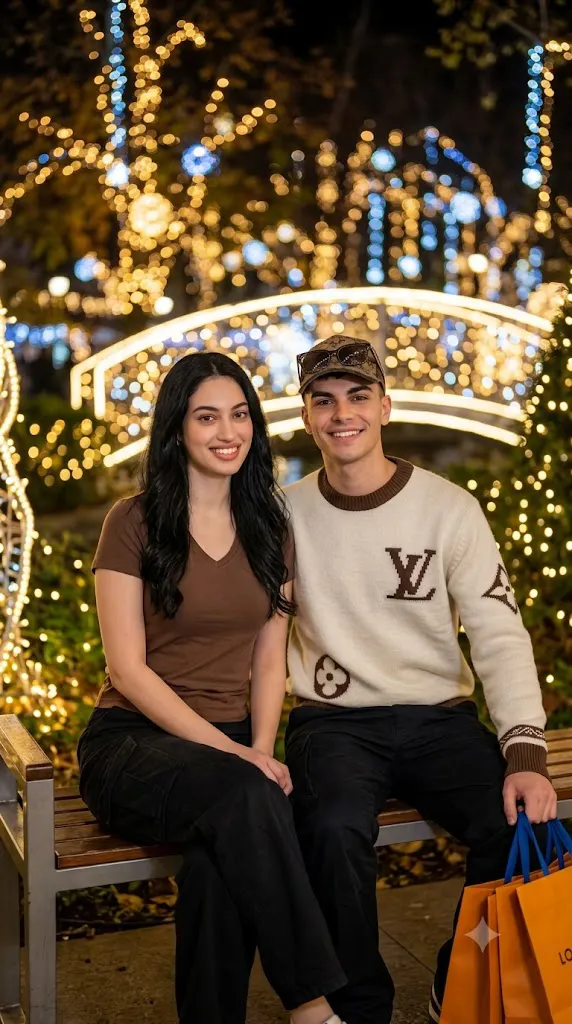
The Cinematic Playground Night Couple Portrait Prompt is designed to create a heartwarming lifestyle portrait that blends romance, fashion, and cinematic storytelling into a single realistic image. Inspired by modern Korean photography, editorial lifestyle magazines, and nighttime city aesthetics, this prompt places two people in a beautifully illuminated playground surrounded by glowing lights, soft bokeh, and a peaceful evening atmosphere.
"Cinematic Playground Night Couple Portrait Prompt"
Create a photorealistic nighttime couple portrait using the uploaded image strictly as the facial identity reference. Preserve the exact facial structure, skin tone, eyes, nose, lips, jawline, and all recognizable facial characteristics without beautification. Transform the subject into a young woman with long, naturally wavy dark hair wearing a brown V-neck T-shirt and black cargo pants. Place her beside a stylish Korean-inspired man wearing coordinated casual clothing. Position both subjects sitting naturally together inside a beautifully illuminated playground at night. Surround the environment with warm decorative lights, realistic park elements, and soft cinematic bokeh. Use gentle ambient lighting with subtle facial illumination, realistic skin texture, moderate depth of field, professional DSLR quality, cinematic color grading, and ultra-detailed HD realism. No text or watermark.
Unlike traditional posed portraits, this concept focuses on creating a candid moment between two people. The scene should feel natural and emotionally engaging, as though it captures a quiet conversation or a relaxing evening together. Soft expressions, comfortable body language, and realistic lighting help transform an ordinary setting into an editorial-quality photograph.
A key requirement of this prompt is complete facial identity preservation. When using an uploaded reference photo, the subject’s face must remain exactly the same. The AI should preserve the original facial structure, skin tone, eyes, eyebrows, nose, lips, jawline, hairstyle around the face, and all unique facial characteristics. Clothing, hairstyle length, environment, and accessories may change, but the person's identity must remain instantly recognizable.
The wardrobe reflects a clean and modern casual fashion style. The female subject wears a soft brown V-neck T-shirt paired with black cargo pants, creating a comfortable yet fashionable appearance. Beside her sits a Korean-inspired male companion wearing a coordinated outfit in similar colors, reinforcing the couple aesthetic while maintaining a balanced composition.
The playground setting creates a nostalgic and romantic mood. Decorative lights, illuminated play equipment, park benches, and distant city lighting provide depth and warmth. The glowing lights naturally produce beautiful circular bokeh that enhances the cinematic atmosphere without distracting from the subjects.
Lighting should simulate warm evening illumination, combining ambient park lights with subtle fill light that gently illuminates the faces. This creates realistic skin tones, soft shadows, and attractive catchlights in the eyes while preserving the authenticity of nighttime photography.
Captured using a professional DSLR or mirrorless camera with a fast prime lens, the portrait should feature moderate depth of field, realistic textures, HD resolution, and cinematic color grading suitable for lifestyle editorials, fashion portfolios, social media campaigns, or personal keepsakes.
How To Use Photo Editing?
Professional editing helps transform the generated portrait into a polished editorial image while maintaining realism.
Begin by balancing exposure so that both subjects remain clearly visible without overexposing nearby light sources.
Adjust white balance to preserve warm nighttime lighting while maintaining natural skin tones. Avoid excessive orange or blue color shifts.
Retain realistic skin texture. Editorial portraits should look polished without removing natural facial detail or creating artificial smoothing.
Enhance clothing textures carefully. Cotton fabrics, cargo pants, and accessories should display realistic material definition.
Improve the quality of the background lights by refining bokeh circles while avoiding unnatural shapes or excessive blur.
Increase local contrast slightly around facial features and hair to improve clarity while keeping the background soft.
Finish with subtle cinematic color grading and fine film grain to create a premium editorial appearance.
Tools You Can Use For Prompt Copy and Create Photo
Several AI platforms and editing applications can help produce realistic cinematic couple portraits.
AI Image Generation Tools
ChatGPT
Ideal for creating detailed prompts describing identity preservation, fashion styling, composition, lighting, and environment.
Midjourney
Produces artistic cinematic portraits with rich lighting and beautiful compositions.
Leonardo AI
Excellent for realistic faces, clothing details, and natural lighting.
Ideogram
Suitable for lifestyle portraits and creative editorial concepts.
Adobe Firefly
Provides AI image generation integrated with Adobe Creative Cloud.
Photo Editing Software
Adobe Photoshop
Perfect for advanced retouching, lighting adjustments, and removing unwanted artifacts.
Adobe Lightroom
Excellent for exposure correction, cinematic color grading, and overall image refinement.
Capture One
Offers professional color control and natural skin-tone rendering.
Affinity Photo
Provides advanced editing capabilities for editorial-quality images.
Snapseed
Useful for mobile editing involving warmth, sharpness, contrast, and subtle finishing touches.
How To Edit Photo?
Step 1: Generate the Base Portrait
Create the couple scene while preserving the uploaded facial identity exactly.
Step 2: Balance Exposure
Maintain realistic brightness throughout both subjects and surrounding lights.
Step 3: Preserve Natural Skin
Keep authentic skin texture and facial details without excessive smoothing.
Step 4: Enhance Clothing Details
Improve texture on T-shirts, cargo pants, and accessories while maintaining realism.
Step 5: Refine Hair
Increase detail within the long wavy hairstyle while preserving natural movement.
Step 6: Improve Background Lighting
Enhance decorative lights and playground illumination without creating unrealistic glow.
Step 7: Strengthen Bokeh
Refine background blur to create soft circular highlights while keeping subjects sharp.
Step 8: Apply Cinematic Color Grading
Balance warm golden lighting with natural skin tones and subtle nighttime contrast.
Step 9: Add Fine Film Grain
Introduce delicate analog-inspired grain that enhances realism without reducing sharpness.
Step 10: Verify Facial Consistency
Confirm the subject's face perfectly matches the uploaded reference photograph.
Step 11: Final Refinements
Remove visual artifacts while maintaining realistic lighting transitions and clean composition.
Step 12: Export in High Resolution
Save the completed portrait as PNG or TIFF to preserve maximum quality for albums, portfolios, social media, or professional printing.
Conclusion
The Cinematic Playground Night Couple Portrait Prompt combines romance, lifestyle photography, and cinematic lighting to create an emotionally engaging editorial portrait. Rather than relying on dramatic fantasy elements, it celebrates a quiet, authentic moment shared between two people in a beautifully illuminated nighttime setting.
The combination of facial identity preservation, coordinated casual fashion, warm playground lights, dreamy bokeh, and realistic nighttime photography creates an image that feels both intimate and professionally crafted. Every detail—from clothing textures to lighting and composition—works together to tell a believable visual story.
While AI image generation can produce impressive results quickly, truly outstanding portraits depend on carefully written prompts and thoughtful editing. Preserving facial identity, balancing exposure, refining lighting, enhancing textures, and maintaining harmonious color grading ensure that the final portrait feels natural, cinematic, and timeless.
Whether you're creating romantic keepsakes, lifestyle editorials, portfolio work, social media content, or creative photography projects, the Cinematic Playground Night Couple Portrait Prompt provides an excellent foundation for producing beautiful, photorealistic nighttime portraits with warmth, emotion, and modern editorial style.