Introduction
The Cinematic Ocean Sunset Cliff Portrait Prompt is inspired by the grandeur of nature and the visual language of modern cinematic photography. It combines breathtaking coastal scenery with editorial fashion styling to create an image that feels powerful, emotional, and timeless. Rather than presenting a standard portrait, this concept tells a story of solitude, confidence, and quiet reflection against the immense beauty of the ocean.
"Cinematic Ocean Sunset Cliff Portrait Prompt"
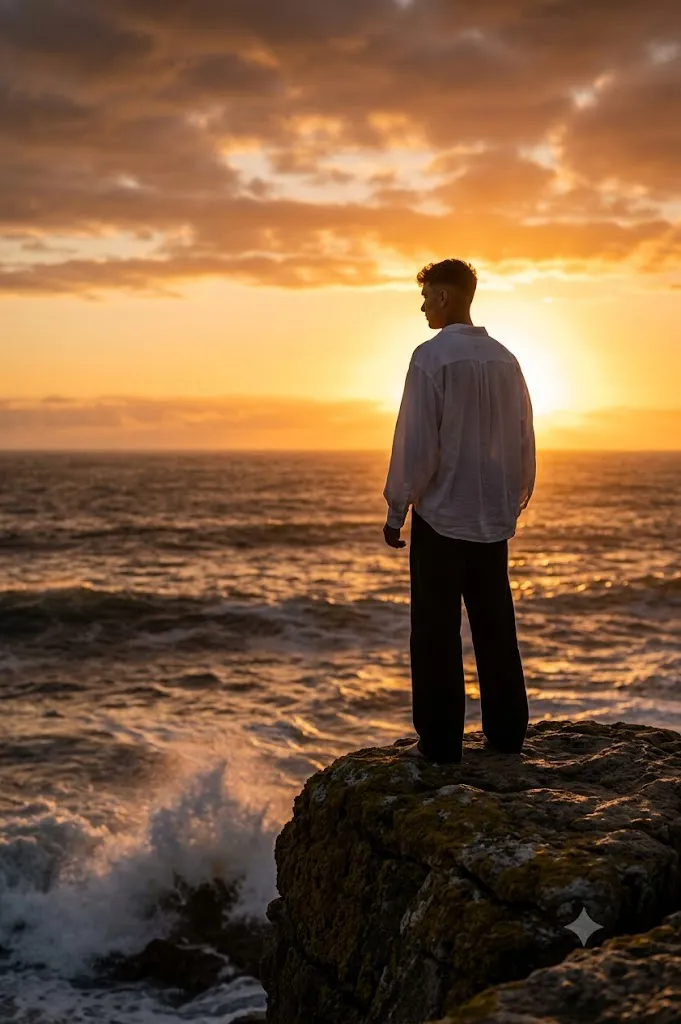
Create an ultra-realistic cinematic portrait of a young man standing confidently on a moss-covered cliff overlooking a vast ocean at sunset. He wears a flowing oversized white shirt and dark wide-leg trousers. The setting sun creates powerful golden-hour backlighting with a warm rim light outlining his figure. Behind him, dramatic clouds glow with shades of orange, gold, and soft crimson while powerful ocean waves crash against the rocks below. Maintain realistic textures in the clothing, rocks, and water. Use an 85mm lens with shallow depth of field, cinematic editorial composition, photorealistic lighting, premium fashion photography style, rich golden-hour colors, ultra-detailed clouds, soft ocean mist, and 8K resolution.
The portrait features a young man standing on a moss-covered cliff or rugged rock overlooking a vast, turbulent sea during sunset. He wears a flowing oversized white shirt paired with dark wide-leg trousers, creating a striking contrast against the glowing horizon. Warm golden sunlight sits just above the ocean, wrapping the subject in dramatic rim lighting that defines his silhouette while preserving subtle facial and clothing details.
The environment plays an equally important role in the composition. Powerful ocean waves crash against the rocks below, sending white sea spray into the air. The sky is filled with layered clouds illuminated by brilliant shades of gold, orange, and soft crimson. The combination of moving water, textured clouds, and warm backlighting creates an atmosphere that feels both cinematic and deeply emotional.
Although the subject appears slightly silhouetted, realistic textures remain visible throughout the clothing and figure. The oversized shirt catches the ocean breeze naturally, introducing graceful movement that enhances the storytelling. The final result resembles a premium fashion editorial captured during the final moments of golden hour using a professional DSLR camera.
Whether you're creating AI artwork, cinematic posters, editorial portraits, travel-inspired photography, or dramatic social media visuals, this prompt delivers a perfect blend of realism, fashion, and natural beauty.
How To Use Photo Editing?
Once the image has been generated, careful editing helps emphasize its cinematic atmosphere while maintaining a natural appearance. The objective is to enhance the dramatic lighting without making the photograph appear artificial.
Begin by balancing the exposure. Since the sun is positioned directly behind the subject, highlight recovery is important to preserve detail in the sky while keeping the figure naturally illuminated. Avoid over-darkening the subject into a pure silhouette unless that artistic effect is intentionally desired.
Next, strengthen the golden-hour color palette. Warm oranges, rich yellows, and soft crimson tones should dominate the sunset while maintaining realistic color transitions. The ocean can retain cooler blue-gray tones to create pleasing contrast against the warm sky.
Adjust local contrast carefully. Increase texture in the moss-covered rocks, ocean waves, and clouds while preserving smooth gradients across the sky. Fine detail adds realism without making the image appear over-processed.
Enhance the rim lighting subtly around the shirt, shoulders, and hair. This separation reinforces the cinematic feel while keeping the subject visually connected to the environment.
Natural skin texture should always remain intact. Avoid excessive skin smoothing or artificial beauty filters. Realistic pores and subtle facial details contribute significantly to a professional editorial appearance.
Finally, introduce a gentle cinematic vignette around the edges of the frame. This naturally directs attention toward the subject while preserving the expansive feeling of the coastal landscape.
Tools You Can Use For Prompt Copy and Create Photo
Creating high-quality cinematic portraits becomes much easier when combining advanced AI image generators with professional editing software.
AI Image Generation Tools
ChatGPT
ChatGPT helps create detailed prompts describing composition, lighting, wardrobe, environmental elements, and camera settings with remarkable precision.
Midjourney
Midjourney produces artistic landscapes, cinematic skies, and editorial-quality portraits with impressive atmospheric lighting.
Leonardo AI
Leonardo AI specializes in realistic human portraits while maintaining excellent environmental detail.
Ideogram
Ideogram works well for poster-style compositions and visually balanced editorial imagery.
Adobe Firefly
Adobe Firefly integrates AI image generation with professional creative editing workflows.
Photo Editing Software
Adobe Photoshop
Perfect for advanced color grading, sky enhancement, lighting adjustments, and detailed retouching.
Adobe Lightroom
Excellent for exposure balancing, sunset color grading, highlight recovery, and tonal refinement.
Capture One
Provides exceptional skin-tone rendering and professional color management.
Affinity Photo
Offers comprehensive editing tools suitable for cinematic portrait finishing.
Snapseed
An excellent mobile editing application for quick adjustments to lighting, contrast, and color.
How To Edit Photo?
Step 1: Generate the Base Portrait
Begin with an AI-generated image that captures the complete coastal environment and cinematic composition.
Step 2: Balance Exposure
Recover highlight detail in the sky while preserving realistic visibility throughout the subject.
Step 3: Enhance Golden-Hour Colors
Increase warm orange and golden tones while maintaining natural color harmony.
Step 4: Improve Ocean Detail
Enhance wave textures, sea spray, and rocky surfaces without creating unrealistic sharpness.
Step 5: Refine Rim Lighting
Strengthen the sunlight outlining the subject to improve depth and separation.
Step 6: Preserve Clothing Texture
Maintain realistic fabric folds and movement in the oversized shirt.
Step 7: Adjust Contrast
Deepen shadows slightly while protecting important details in darker areas.
Step 8: Refine Skin Texture
Keep natural pores and facial features without excessive retouching.
Step 9: Improve Background Depth
Maintain atmospheric perspective while preserving recognizable cloud formations.
Step 10: Apply Cinematic Color Grading
Blend warm sunset tones with subtle cool ocean colors for a balanced visual style.
Step 11: Final Sharpening
Apply selective sharpening to the subject while allowing distant scenery to remain naturally softer.
Step 12: Export the Final Image
Save the portrait in PNG or TIFF format to preserve maximum detail and color quality.
Conclusion
The Cinematic Ocean Sunset Cliff Portrait Prompt captures the emotional beauty of nature through dramatic lighting, thoughtful composition, and editorial fashion styling. Rather than relying solely on visual spectacle, the prompt creates a feeling of quiet strength, freedom, and introspection by placing the subject within an expansive coastal landscape.
The combination of glowing sunsets, crashing waves, textured cliffs, and flowing clothing creates an image that feels both timeless and cinematic. Warm golden-hour lighting, realistic environmental textures, and professional camera aesthetics elevate the portrait beyond a standard landscape photograph into a premium editorial artwork.
Modern AI image-generation technology makes creating scenes like this remarkably accessible, but exceptional results still depend on carefully written prompts and refined post-processing. Attention to lighting, composition, realistic textures, and balanced color grading transforms an ordinary render into a visually compelling masterpiece.
Whether you're designing travel-inspired artwork, luxury fashion editorials, cinematic posters, portfolio images, or dramatic social media content, the Cinematic Ocean Sunset Cliff Portrait Prompt provides an ideal foundation for creating memorable imagery. By combining photorealism with emotional storytelling, it delivers portraits that are both visually breathtaking and artistically meaningful.