Introduction
Cinematic Double Exposure Love Portraits have become one of the most creative and emotional trends in modern AI photo editing and digital photography. This artistic editing style combines two images into one powerful composition to create a dreamy storytelling effect. The primary portrait usually focuses on close emotional expressions, while the secondary exposure adds depth, atmosphere, and cinematic emotion to the artwork.
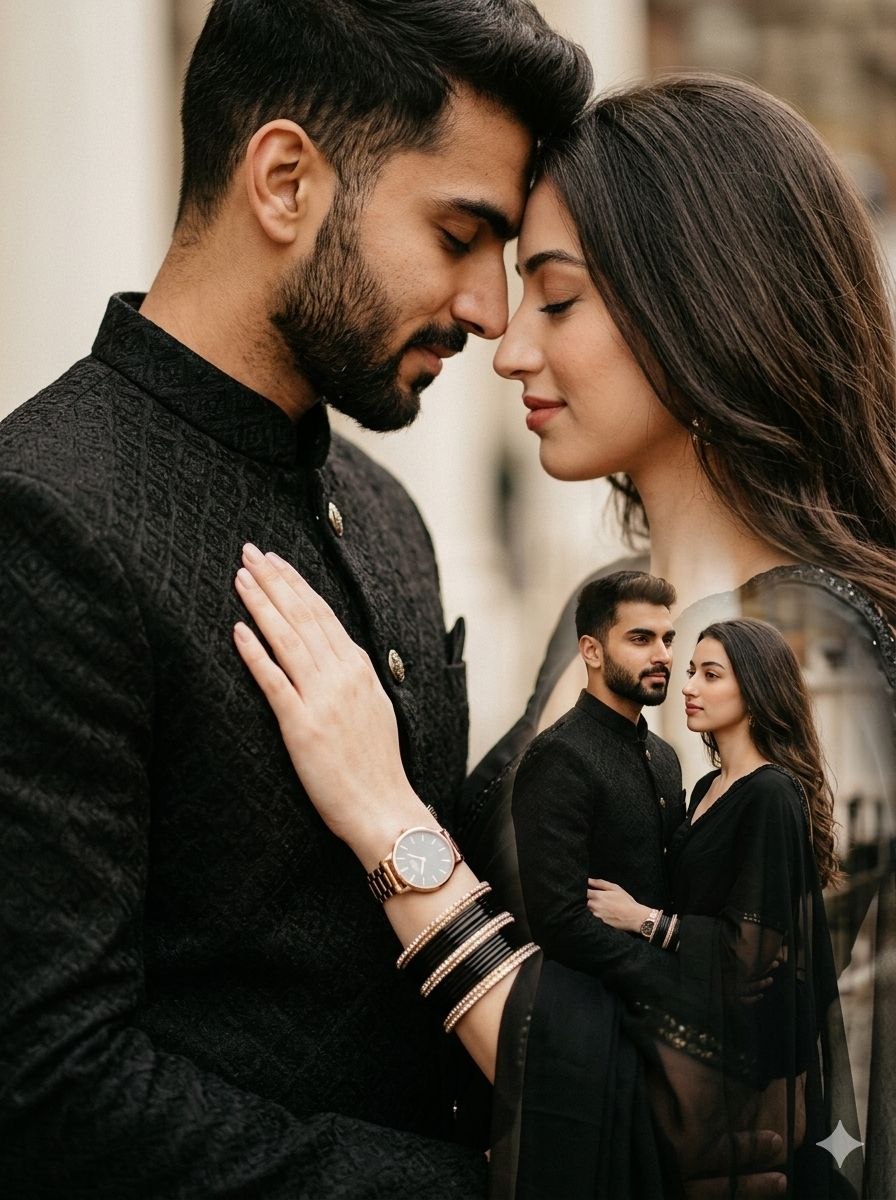
In romantic double exposure portraits, couples are often shown in soft embraces, forehead-to-forehead poses, or emotional close-ups blended with another cinematic scene such as standing silhouettes, city lights, landscapes, or dramatic backgrounds. The combination creates a premium movie-poster style effect that feels artistic, emotional, and visually stunning.
This style is highly popular on Instagram, Pinterest, and AI photography communities because it transforms ordinary couple photos into elegant cinematic masterpieces. With the help of AI tools and modern editing apps, anyone can now create ultra-realistic double exposure portraits without advanced photography skills.
In this article, you will learn how to use photo editing techniques, discover the best tools for prompt-based AI image generation, understand cinematic double exposure effects, and learn step-by-step editing methods to create professional romantic portraits.
How To Use Photo Editing?
Photo editing is the process of improving and transforming an image by adjusting lighting, colors, textures, shadows, composition, and visual storytelling. Cinematic editing focuses more on mood, emotions, and artistic atmosphere instead of heavy filters.
To create a Cinematic Double Exposure Love Portrait, you should focus on the following important elements:
1. Emotional Composition
The heart of a romantic double exposure portrait is emotional connection. Poses such as forehead touches, closed eyes, soft embraces, and natural hand placement create intimacy and storytelling.
2. Double Exposure Blending
Double exposure combines two images into one composition. One image acts as the primary portrait while the second image adds artistic cinematic depth.
3. Cinematic Lighting
Soft rim lighting, warm highlights, and balanced shadows help create a premium movie-like atmosphere.
4. Realistic Skin Texture
Avoid excessive smoothing. Realistic pores and natural skin details make the portrait look authentic and professional.
5. Dramatic Background
Dark cinematic backgrounds, glowing lights, fog, or soft gradients enhance the emotional mood of the image.
6. Color Grading
Warm black, silver, golden, and soft brown tones create an elegant cinematic aesthetic perfect for romantic portraits.
Tools You Can Use For Prompt Copy And Create Photo
Modern AI tools and editing apps make it easy to create realistic cinematic double exposure portraits simply by using detailed prompts. These tools are beginner-friendly and capable of producing professional-quality visuals.
1. ChatGPT
ChatGPT is one of the best tools for creating detailed cinematic AI prompts. You can describe emotions, lighting, outfits, background style, camera angle, and artistic atmosphere to generate realistic prompts.
Example Prompt Elements:
Double exposure effect
Romantic embrace
Cinematic DSLR portrait
Soft rim lighting
Emotional expressions
Realistic skin texture
Detailed prompts help AI understand the exact visual style you want.
2. Gemini AI
Gemini AI is popular for realistic cinematic image generation. It understands long prompts and creates detailed artistic portraits with emotional realism.
Best Uses:
Romantic portraits
Double exposure effects
Cinematic storytelling
Editorial-style photography
3. Midjourney
Midjourney is one of the best AI tools for artistic and cinematic visuals. It creates premium-quality lighting, textures, and emotional compositions.
Features:
Movie-poster aesthetics
Dramatic lighting
Artistic double exposure blending
Cinematic depth and atmosphere
4. Adobe Photoshop
Photoshop is the most powerful tool for creating manual double exposure effects.
You can use it to:
Blend multiple images
Add cinematic shadows
Adjust opacity
Create smooth overlays
Improve lighting and contrast
5. Adobe Lightroom
Lightroom is excellent for cinematic color grading and portrait enhancement.
Useful Features:
Warm cinematic tones
Contrast adjustment
Skin tone enhancement
Shadow control
Premium color grading
6. Snapseed
Snapseed is a free mobile editing app with useful tools for cinematic editing.
Useful Features:
Double exposure mode
Portrait enhancement
Selective brightness
HDR balance
Blur effects
How To Edit Photo?
Creating a Cinematic Double Exposure Love Portrait requires careful editing and attention to detail. Follow these steps for professional results.
Step 1: Select High-Quality Photos
Choose clear and high-resolution images with:
Sharp facial details
Natural expressions
Balanced lighting
Emotional poses
High-quality images produce better cinematic edits.
Step 2: Use a Detailed AI Prompt
A strong prompt is the secret behind realistic AI-generated portraits.
Example Prompt:
“A hyper-realistic 8K cinematic DSLR double exposure portrait of a romantic couple. The primary close-up shows the couple forehead to forehead with eyes closed in a soft emotional embrace. The man has a beard and wears a black patterned sherwani jacket. The woman wears an elegant black outfit with stylish bangles, her hand resting gently on his chest showing a wristwatch. The secondary exposure shows both of them standing together in a cinematic environment with dramatic lighting and emotional depth. Soft rim light, realistic skin texture, dark cinematic background, movie-poster style color grading, ultra-realistic photography.”
A detailed prompt helps AI understand:
Facial expressions
Lighting
Mood
Outfit styling
Background atmosphere
Cinematic composition
Step 3: Create the Double Exposure Effect
In Photoshop or Snapseed:
Place the primary portrait
Add the secondary image layer
Adjust opacity carefully
Blend images smoothly
Maintain clear facial details
The blending should feel soft and artistic.
Step 4: Adjust Lighting
Use cinematic lighting adjustments:
Add soft highlights
Increase shadow depth
Create rim lighting
Maintain balanced exposure
Lighting should feel dramatic yet natural.
Step 5: Apply Cinematic Color Grading
Use:
Deep black shadows
Warm golden highlights
Soft silver tones
Slight matte finish
Balanced colors create a premium cinematic look.
Step 6: Enhance Skin Naturally
Do not over-edit faces.
Instead:
Keep natural texture
Maintain realistic pores
Reduce blemishes softly
Preserve authentic details
This creates a luxury editorial appearance.
Step 7: Final Adjustments
Before exporting:
Improve overall contrast
Balance lighting
Sharpen eyes slightly
Keep the cinematic softness intact
Export the image in high resolution for the best visual quality.
Conclusion
Cinematic Double Exposure Love Portraits combine romance, artistic storytelling, and premium visual aesthetics into one stunning photography style. With the help of AI prompts, editing apps, and cinematic lighting techniques, anyone can create ultra-realistic romantic portraits that look emotional and professional.
The secret behind cinematic editing is balanced lighting, emotional composition, realistic skin texture, and smooth double exposure blending instead of excessive effects. Whether you use ChatGPT for prompt writing, Gemini AI for image generation, Photoshop for blending, or Lightroom for cinematic color grading, the key is maintaining realism and emotional depth.
As AI photography continues to evolve, cinematic double exposure portraits are becoming more creative and accessible every day. By learning proper prompt writing and editing techniques, you can transform ordinary couple photos into breathtaking movie-style masterpieces with premium cinematic quality.