Introduction
Modern photography is no longer just about capturing a portrait—it is about telling the story behind the camera. One of the most popular trends in AI-generated photography is the Behind-the-Camera Sony LCD Portrait, where the viewer experiences the moment from the photographer's perspective. Instead of focusing only on the subject, the camera itself becomes an important part of the composition, creating an authentic behind-the-scenes atmosphere that feels both cinematic and professional.
"Cinematic Behind-the-Camera Sony LCD Portrait Prompt"
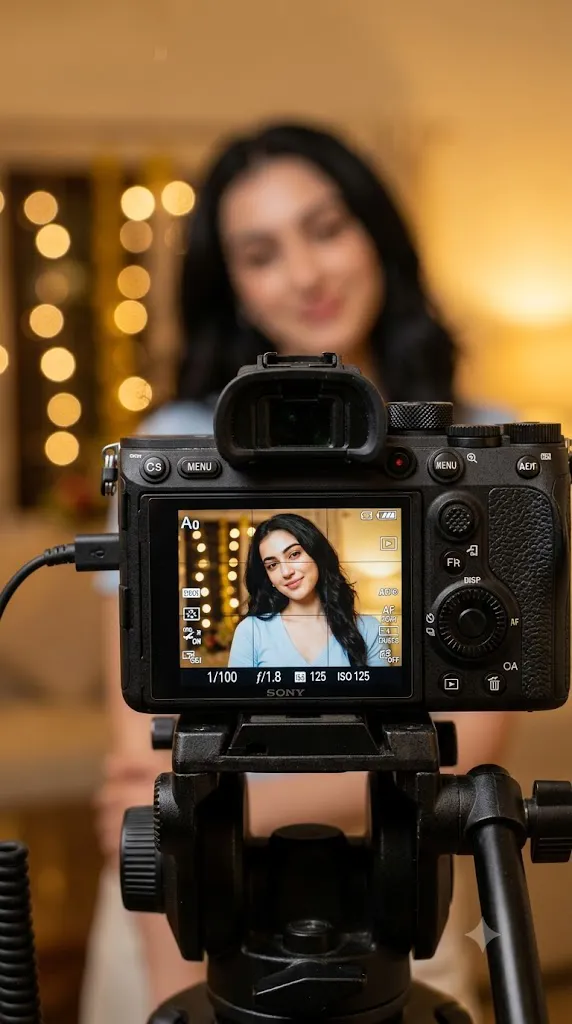
Use the uploaded image strictly as the only facial reference while preserving the person's identity with complete accuracy. Create an ultra-photorealistic behind-the-scenes photography composition viewed from behind a professional Sony mirrorless camera. The camera body dominates the foreground with detailed controls, textured grip, and reflective LCD glass. The rear LCD screen displays the exact person smiling naturally while wearing a pastel-blue V-neck top, maintaining identical facial structure and skin tone. The actual subject behind the camera remains softly blurred due to shallow depth of field. Warm golden indoor lighting creates cozy cinematic bokeh. Display realistic Sony interface elements including focus grid, shutter speed 1/100, aperture f/1.8, ISO 125, battery indicator, autofocus icons, and recording information. Include a naturally hanging microphone cable. Editorial photography, 50mm lens, f/1.8, HDR, realistic reflections, premium lifestyle aesthetic, DSLR quality, 8K resolution.
This prompt recreates the experience of looking through the back of a professional Sony mirrorless camera. The camera body dominates the foreground with its detailed buttons, textured grip, reflective LCD glass, and realistic interface. On the LCD screen appears the exact person from the uploaded reference image, maintaining 100% facial identity. Every recognizable facial characteristic—including facial structure, jawline, eyes, nose, lips, skin tone, hairstyle, and natural expression—must remain completely unchanged.
The portrait displayed on the LCD screen features a relaxed smile, a gentle head tilt, and soft eye direction, producing a warm and approachable appearance. The person wears a pastel-blue V-neck top with naturally flowing hair and minimal makeup, emphasizing realism rather than glamour.
Behind the camera, the actual subject remains softly blurred due to an extremely shallow depth of field. This contrast between the razor-sharp LCD display and creamy background blur immediately creates the impression of genuine professional photography.
Warm golden indoor lighting fills the environment with amber tones while cinematic bokeh softly illuminates the background. Additional details—including a hanging microphone cable, realistic Sony interface icons, camera settings, autofocus indicators, battery information, and exposure values—make the entire scene feel like a genuine content creator's workspace.
The final image resembles a premium editorial photograph rather than a computer-generated illustration, making this prompt perfect for photography portfolios, social media content, YouTube creators, technology showcases, and modern lifestyle branding.
How To Use Photo Editing?
Although AI image generators can create highly realistic results, professional editing helps refine the final portrait and strengthen its cinematic appearance. Since realism is the primary goal, adjustments should remain subtle and believable.
Begin by balancing the exposure. The LCD screen should remain the brightest and sharpest element within the composition while preserving all interface details. Avoid clipping highlights inside the display.
Adjust the white balance toward warm amber tones to recreate comfortable indoor lighting. Golden illumination should softly wrap around the camera body while maintaining neutral skin tones inside the LCD image.
Increase local contrast only on the camera body and LCD screen. Buttons, textured grip surfaces, and engraved markings benefit from additional clarity without making the image appear artificially sharpened.
Reflections on the LCD glass deserve special attention. Gentle reflections enhance realism but should never obscure the subject's face or camera interface.
Maintain a strong shallow depth of field. The foreground camera and LCD remain perfectly sharp while the actual subject and background dissolve into creamy bokeh.
Enhance realistic material textures including brushed metal, rubber grip surfaces, microphone cable, camera buttons, and glass reflections.
Preserve authentic skin texture throughout editing. Avoid beauty filters or aggressive smoothing that may compromise facial identity.
Finally, perform subtle cinematic color grading by combining warm highlights with slightly cooler shadow regions. This creates visual depth while maintaining a premium editorial appearance.
Tools You Can Use For Prompt Copy and Create Photo
Producing realistic behind-the-scenes photography requires both advanced AI generation and professional editing software.
AI Image Generation Tools
ChatGPT
ChatGPT helps create highly detailed prompts describing camera equipment, lighting, facial preservation, composition, and technical photography settings.
Midjourney
Midjourney generates cinematic environments with excellent artistic lighting and professional compositions.
Leonardo AI
Leonardo AI excels at realistic portrait generation while maintaining facial consistency.
Ideogram
Ideogram creates clean editorial layouts and realistic lifestyle imagery.
Adobe Firefly
Adobe Firefly integrates AI image generation into professional creative workflows with excellent commercial-quality output.
Photo Editing Software
Adobe Photoshop
Ideal for refining LCD reflections, interface details, camera textures, and cinematic color grading.
Adobe Lightroom
Excellent for exposure correction, white balance adjustment, contrast, and natural color enhancement.
Capture One
Offers exceptional color accuracy and natural skin rendering suitable for editorial photography.
Affinity Photo
A professional editing alternative with advanced retouching capabilities.
Snapseed
Useful for quick mobile adjustments including exposure, sharpening, and cinematic tonal refinement.
How To Edit Photo?
Step 1: Generate the Base Image
Create the initial portrait while preserving the uploaded facial identity exactly.
Step 2: Balance Exposure
Keep the LCD display bright without losing highlight detail.
Step 3: Enhance Camera Detail
Improve texture on buttons, dials, grip surfaces, and engraved labels.
Step 4: Refine LCD Reflections
Add realistic reflections while maintaining full visibility of the portrait.
Step 5: Strengthen Depth of Field
Ensure the LCD remains perfectly sharp while the background stays beautifully blurred.
Step 6: Improve Color Grading
Apply warm indoor lighting with balanced skin tones and cinematic contrast.
Step 7: Preserve Facial Identity
Avoid altering facial proportions, expression, hairstyle, or skin characteristics.
Step 8: Refine Interface Elements
Ensure camera settings, focus grids, and icons appear clean and realistic.
Step 9: Add Material Realism
Enhance the appearance of glass, metal, rubber, and cable textures.
Step 10: Fine-Tune Composition
Maintain strong visual emphasis on the LCD while preserving balanced framing.
Step 11: Final Sharpening
Apply selective sharpening to the LCD display and camera body only.
Step 12: Export in High Resolution
Save the completed image in PNG or TIFF format to preserve maximum quality.
Conclusion
The Cinematic Behind-the-Camera Sony LCD Portrait Prompt offers a creative perspective that transforms an ordinary portrait into a compelling visual story. By placing the viewer behind a professional camera and making the LCD screen the focal point, the composition captures both the subject and the creative process itself.
Preserving the exact facial identity ensures authenticity, while realistic camera hardware, detailed interface graphics, warm indoor lighting, and shallow depth of field combine to create a premium editorial look. The contrast between the crisp LCD image and the softly blurred surroundings gives the photograph an immersive, cinematic quality that feels natural and believable.
Modern AI image-generation tools make it possible to produce this level of realism with remarkable accuracy, but the quality of the result depends heavily on a well-crafted prompt and thoughtful post-processing. Careful attention to reflections, textures, lighting, and color harmony helps transform an already impressive render into a portfolio-worthy image.
Whether you're creating content for photography enthusiasts, technology showcases, lifestyle branding, YouTube thumbnails, or social media, this prompt provides a sophisticated way to present portraits from a fresh perspective. The combination of authentic facial preservation, professional camera aesthetics, and cinematic storytelling creates an image that feels both technically refined and emotionally engaging.