Introduction
Modern AI photography and cinematic portrait editing have completely transformed the creative industry. Today, creators can produce ultra-realistic fashion portraits using only a detailed prompt, a reference image, and powerful AI tools. One of the most visually attractive trends currently popular on Instagram, Pinterest, and photography pages is the “Bougainvillea Drift” cinematic portrait aesthetic.
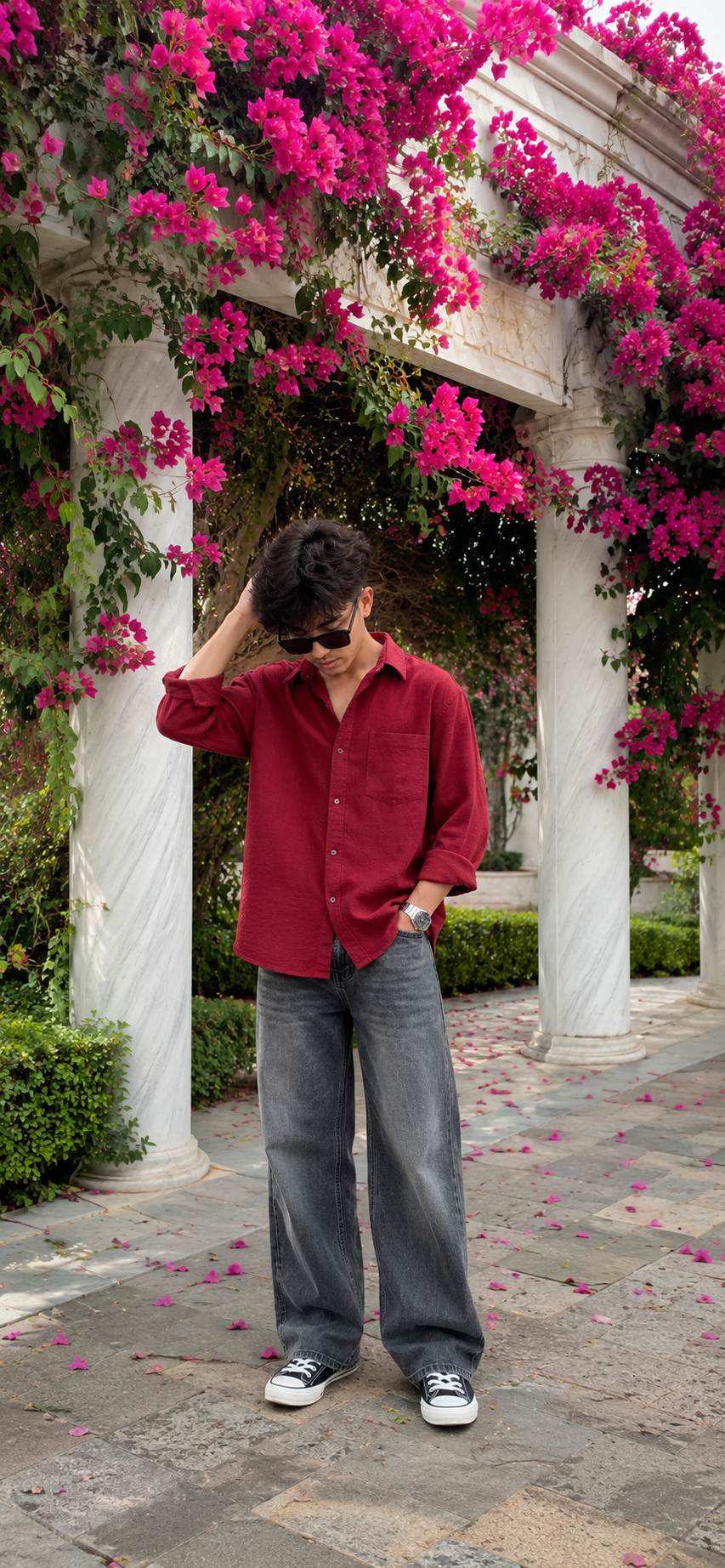
This portrait style combines vibrant pink bougainvillea flowers, white marble architecture, natural outdoor lighting, luxury street fashion, and realistic mobile photography quality into one premium editorial image. The soft sunlight, dreamy background blur, textured fashion styling, and natural pose create a cinematic atmosphere that feels modern, elegant, and highly professional.
A well-written prompt is the most important part of generating a realistic portrait. Every detail inside the prompt helps the AI understand the exact environment, lighting, outfit styling, facial expression, camera angle, and cinematic mood required for the final image. Small details like realistic skin texture, iPhone HDR quality, flower density, body posture, and background composition dramatically improve realism.
The “Bougainvillea Drift” concept focuses heavily on natural storytelling. Instead of stiff studio posing, the portrait feels candid and relaxed. The subject stands calmly under blooming bougainvillea flowers while soft sunlight creates a premium lifestyle aesthetic. This type of image often looks similar to high-end travel photography or luxury fashion campaigns captured using professional mobile photography techniques.
One of the strongest parts of this cinematic concept is the detailed prompt structure:
“Ultra-realistic iPhone portrait photo of a young man standing under a large white marble structure and bougainvillea filled with dense vibrant hot-pink flowers and fresh green leaves, flowers covering the structure naturally. Full-body shot, vertical composition, captured on iPhone camera with natural HDR detail, sharp focus, realistic texture, premium mobile photography quality. The young man is standing on a stone-paved garden pathway in a relaxed candid pose, head tilted downward, eyes looking at the ground, calm thoughtful expression. He is adjusting the black side of his hair from his left hand. He has medium length messy textured hair, soft facial features, medium skin tone, natural skin texture. Outfit: boxy-fit cherry red button-down shirt with sleeves rolled slightly above wrists, loose fit untucked style, grey heavy washed wide-leg denim jeans, metal wrist watch, rectangle frame dark lens sunglasses, Converse all star black and white sneakers.”
This prompt creates a complete cinematic visual scene by combining fashion styling, natural environment, realistic lighting, and mobile photography aesthetics into one luxury portrait concept.
How To Use Photo Editing?
Photo editing plays a major role in transforming a good AI portrait into a premium cinematic masterpiece. Even if the generated image already looks realistic, editing improves lighting balance, sharpness, colors, skin texture, and overall visual depth.
The first step is selecting the strongest generated image. Choose the image with the best facial structure, realistic hand positioning, natural body posture, and balanced background composition. A clean base image always produces better final editing results.
Start editing by adjusting exposure and brightness carefully. Cinematic portraits usually avoid overly harsh contrast. Instead, soft balanced lighting creates a more luxurious and realistic appearance. Slightly increasing warmth can make the sunlight feel richer and more natural.
Skin texture is another important part of editing. Avoid excessive smoothing because modern editorial photography values realistic skin detail. Small pores, natural highlights, and soft texture help maintain authenticity and realism.
Background blur also contributes heavily to cinematic quality. A softly blurred bougainvillea environment creates professional depth-of-field effects similar to DSLR photography. This dreamy background separation helps keep the subject visually dominant.
Next, sharpen important facial areas like eyes, lips, hair strands, and jawline details. Strong facial clarity combined with soft environmental blur creates a premium editorial aesthetic.
Finally, apply cinematic color grading. Warm sunlight tones, balanced shadows, faded blacks, and vibrant flower colors create the luxury mobile-photography look seen in professional lifestyle campaigns.
Tools You Can Use For Prompt Copy And Create Photo
Many AI tools are available today for generating cinematic portraits and realistic fashion photography. Choosing the right platform depends on your creative style and editing workflow.
1. ChatGPT
ChatGPT is one of the best tools for writing detailed cinematic prompts. It helps creators describe camera settings, lighting conditions, outfit styling, facial expressions, and environmental details professionally.
You can use ChatGPT for:
Writing realistic prompts
Creating luxury editorial concepts
Improving cinematic descriptions
Generating social media captions
Building fashion-photography ideas
Shortening or enhancing prompts
Detailed prompts dramatically improve image realism and storytelling quality.
2. Midjourney
Midjourney is famous for cinematic artistic portrait generation. It creates visually rich lighting, dramatic compositions, and fashionable aesthetics.
Advantages:
Cinematic atmosphere
Beautiful color grading
Fashion-style compositions
Luxury visual quality
3. Leonardo AI
Leonardo AI is excellent for ultra-realistic image generation and face consistency. It creates sharp textures and realistic portrait quality.
Advantages:
Strong realism
Better facial consistency
DSLR-style details
High-quality textures
4. Adobe Photoshop
Photoshop remains one of the most powerful tools for professional photo editing and cinematic enhancement.
Photoshop helps with:
Skin retouching
Color correction
Lighting adjustments
Face enhancement
Background cleanup
Professional sharpening
5. Adobe Lightroom
Lightroom is widely used for cinematic color grading and portrait enhancement. It is easier than Photoshop and highly effective for mobile-style photography edits.
Best Lightroom features:
Warm golden presets
Exposure balancing
Cinematic contrast
Highlight control
Natural skin-tone correction
6. Canva
Canva is useful for beginners who want quick social media editing tools. It helps creators design Instagram posts, thumbnails, banners, and portfolio presentations using AI portraits.
How To Edit Photo?
Editing cinematic AI portraits requires balanced adjustments and attention to detail.
Step 1: Upload The Portrait
Open your image inside Photoshop, Lightroom, or another editing software using the highest-resolution version available.
Step 2: Adjust Lighting
Increase warmth slightly to create soft golden sunlight. Lower harsh shadows for a more cinematic and premium atmosphere.
Step 3: Preserve Skin Texture
Retouch carefully while keeping natural pores and realistic skin details visible.
Step 4: Sharpen Facial Features
Increase clarity around the eyes, lips, eyebrows, and hair texture for DSLR-style realism.
Step 5: Improve Background Depth
Add subtle blur if needed to create smooth cinematic separation between the subject and environment.
Step 6: Enhance Colors
Boost flower colors, green leaves, and warm sunlight carefully without oversaturation.
Step 7: Apply Cinematic Color Grading
Use warm highlights, soft shadows, balanced contrast, and faded blacks for a luxury editorial finish.
Conclusion
The “Bougainvillea Drift” cinematic portrait style combines nature, fashion, architecture, and modern mobile photography into one visually stunning editorial aesthetic. The vibrant pink flowers, white marble structures, soft sunlight, and realistic fashion styling create portraits that feel elegant, cinematic, and professional.
Detailed prompts play a huge role in achieving realistic AI-generated results. A carefully written prompt describing lighting, textures, camera settings, poses, and styling helps create high-end portraits that resemble luxury fashion photography.
Editing is equally important because cinematic color grading, realistic skin texture, sharp facial focus, and balanced lighting transform a normal image into a premium masterpiece.
With tools like ChatGPT, Midjourney, Leonardo AI, Photoshop, and Lightroom, creators can now produce stunning cinematic portraits directly from their imagination. By practicing prompt writing and professional editing techniques, anyone can create luxury editorial portraits ready for Instagram, fashion portfolios, or creative digital projects.