Introduction
Portrait photography is one of the most powerful forms of visual storytelling. A well-crafted portrait can reveal personality, emotion, style, and atmosphere in a single frame. With the rise of artificial intelligence image generation, photographers, artists, and content creators can now create ultra-realistic portraits that rival professional DSLR photography. One of the most popular modern styles is the 8K Hyper-Realistic Cinematic Garden Photographer Portrait.
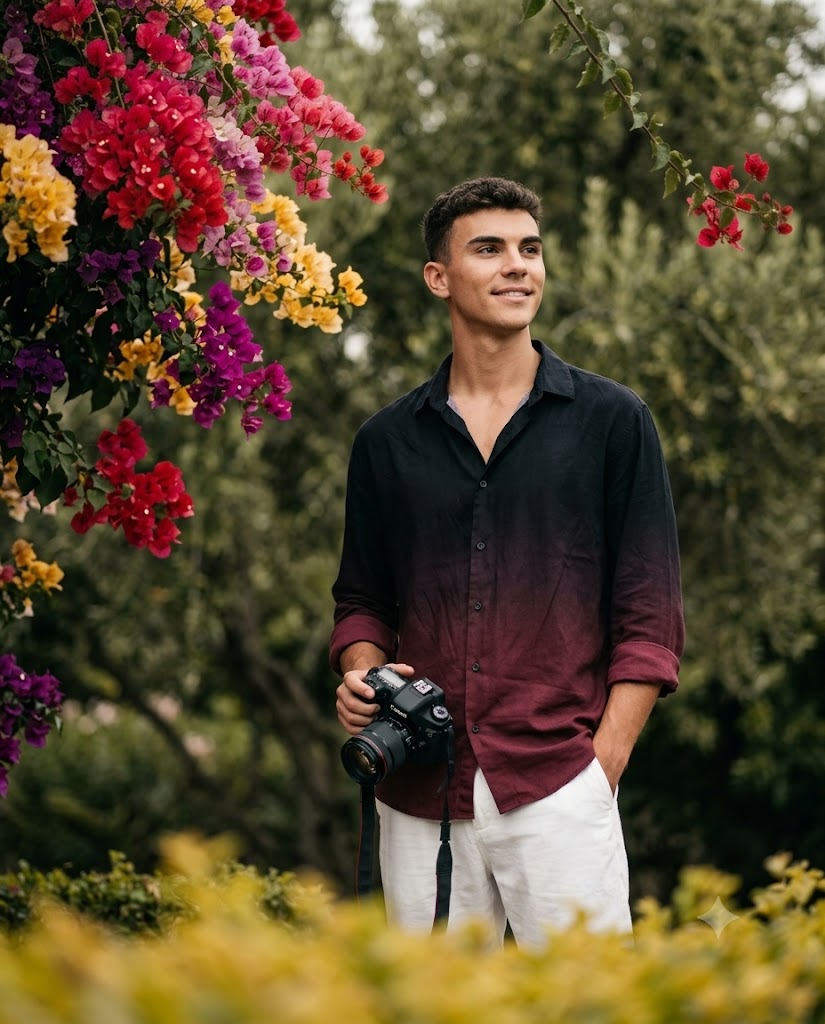
Create an 8K hyper-realistic cinematic outdoor portrait of a reference male subject. Important: Use the provided reference image strictly only for face and identity. He stands slightly right of center in a lush outdoor garden, captured in a relaxed candid photographer-style pose. Expression: soft natural smile, calm off-camera gaze toward the upper-right side. He wears a loose black-to-maroon gradient button-up shirt with subtle vertical fabric texture, black on the upper chest and fading to deep maroon below. The collar is open and relaxed. The sleeves are rolled up naturally, showing maroon cuffs. Pair it with loose clean white pants. His left hand is casually inside the pants pocket. His right hand naturally holds a realistic Canon-style DSLR camera near the lower chest/waist area, slightly to the left side of his body. The camera strap hangs down loosely in a natural loop. Keep the camera size, lens, hands, fingers, and strap realistic. Composition: vertical 4:5 portrait, subject placed slightly lower and slightly right of center, visible from head to mid-thigh. Do not make it a close-up. Leave enough open blurred background space above and around the subject. The subject should occupy around 55–60% of the frame height. Important background and flowers: Do not create a full colorful flower wall behind the subject. The main flowers must be concentrated in the upper-left corner as hanging bougainvillea branches. Add a large vivid red flower cluster at the top-left, with smaller pink, magenta, yellow, and dark purple bougainvillea clusters hanging below it. Add only a small red flower branch near the upper-right area. Behind the subject, keep the background mostly blurred olive-green trees and foliage, not dense flowers. Foreground and depth: Add a warm yellow-green blurred hedge or leaf layer across the lower foreground, creating dreamy depth. Keep the background heavily blurred with creamy bokeh, soft depth of field, and realistic DSLR portrait separation. Color tone must closely match: muted olive-green background, warm yellow-green foreground, soft dark-green cinematic garden atmosphere, slightly desaturated natural colors, gentle warm highlights, creamy bokeh, and natural skin tones. Avoid bright oversaturated colors, harsh contrast, dark shadows, plastic skin, over-sharpening, extra flowers around the body, text, or watermarks. Professional outdoor portrait photography, 85mm lens look, f/1.8 shallow depth of field, soft cinematic lighting, premium DSLR quality.
This style combines natural outdoor environments, cinematic lighting, shallow depth of field, realistic skin textures, and premium camera aesthetics. The result is an image that looks as if it was captured using a professional DSLR camera with a high-end portrait lens. Soft garden backgrounds, beautiful bougainvillea flowers, creamy bokeh, and relaxed poses help create a sophisticated and visually engaging portrait.
Unlike traditional studio photography, garden portraits take advantage of natural surroundings to create depth and atmosphere. Warm sunlight, blurred greenery, and organic colors work together to produce a timeless visual aesthetic. When combined with detailed AI prompts and accurate facial identity preservation, the final result becomes incredibly realistic.
Whether you are creating social media content, portfolio images, photography projects, or AI-generated artwork, the cinematic garden photographer portrait style offers a professional and elegant visual experience.
How To Use Photo Editing?
Photo editing plays an essential role in creating hyper-realistic cinematic portraits. While AI image generators can produce impressive results, editing helps refine details and achieve a polished, professional appearance.
The process begins with a clear reference image. AI systems analyze the facial structure, hairstyle, skin tone, and identity of the subject to ensure consistency throughout the generated image. Once the portrait is created, editing tools can be used to improve realism and visual quality.
Photo editing can help with:
- Enhancing facial details
- Improving natural skin texture
- Adjusting lighting balance
- Refining depth of field
- Enhancing background blur
- Improving color grading
- Correcting exposure
- Increasing image sharpness
- Adding cinematic atmosphere
- Creating professional visual consistency
A key aspect of cinematic portrait editing is maintaining realism. The goal is not to over-edit the image but rather to enhance its natural qualities. Preserving realistic skin texture, authentic lighting, and subtle imperfections helps the portrait feel genuine and believable.
Modern editing tools make it possible to create images that closely resemble professional DSLR photography while maintaining a natural and organic appearance.
Tools You Can Use For Prompt Copy and Create Photo
Several AI platforms and editing tools can help you create high-quality cinematic garden portraits.
1. ChatGPT
ChatGPT is an excellent tool for creating detailed image-generation prompts. Users can describe clothing, poses, lighting, camera settings, and environmental details to generate professional prompts optimized for AI platforms.
2. Flux AI
Flux AI is known for producing highly realistic portraits with exceptional facial accuracy, natural skin textures, and impressive lighting effects.
3. Midjourney
Midjourney specializes in cinematic and artistic image generation. It performs particularly well when creating atmospheric outdoor scenes and professional portrait photography.
4. Leonardo AI
Leonardo AI offers excellent realism and facial consistency, making it a popular choice for portrait-focused projects.
5. Adobe Photoshop
Photoshop remains the industry-standard editing software. It allows users to refine AI-generated images, improve lighting, enhance colors, and perform professional retouching.
6. Canva
Canva provides beginner-friendly tools for editing, layout creation, and social media design.
7. Ideogram
Ideogram helps generate realistic compositions with strong storytelling and visual balance.
8. Google Gemini
Gemini can assist with prompt writing, creative planning, and photography concept development.
Many creators combine these tools to maximize quality. A common workflow involves generating a detailed prompt in ChatGPT, creating the image using Flux AI or Midjourney, and then refining the result in Photoshop.
How To Edit Photo?
Creating an 8K hyper-realistic cinematic garden portrait requires a combination of careful planning and detailed editing.
Step 1: Select a High-Quality Reference Image
Choose a clear photograph with visible facial details and natural lighting. High-quality references help maintain accurate identity preservation.
Step 2: Write a Detailed Prompt
A successful prompt should include:
- Facial preservation instructions
- Clothing details
- Pose description
- Camera specifications
- Background elements
- Flower placement
- Lighting conditions
- Color palette
- Composition requirements
- Realism settings
Detailed prompts significantly improve generation accuracy.
Step 3: Generate the Base Portrait
Upload the reference image and generate multiple versions. AI systems often produce slightly different interpretations, allowing you to choose the best result.
Step 4: Verify Identity Accuracy
Carefully compare the generated image to the reference photograph. Ensure that facial structure, skin tone, hairstyle, and expression remain consistent.
Step 5: Refine Background Composition
The background should remain softly blurred and visually balanced. Avoid excessive details that distract attention from the subject.
For a cinematic garden portrait:
- Keep greenery soft and natural
- Maintain creamy bokeh
- Preserve realistic depth separation
- Use flowers strategically rather than excessively
Step 6: Enhance Lighting
Soft cinematic lighting is one of the defining characteristics of this style.
Focus on:
- Natural highlights
- Gentle shadow transitions
- Balanced exposure
- Warm atmospheric tones
Avoid harsh contrast or overly dramatic shadows.
Step 7: Improve Skin Texture
Professional portraits preserve natural skin details.
Enhance:
- Skin pores
- Fine facial textures
- Natural shading
- Realistic complexion
Avoid heavy smoothing and beauty filters.
Step 8: Adjust Color Grading
The ideal cinematic garden look often includes:
- Muted olive greens
- Warm yellow-green highlights
- Slightly desaturated tones
- Natural skin colors
- Soft contrast
These adjustments help create a premium DSLR aesthetic.
Step 9: Refine Clothing and Camera Details
Pay attention to:
- Fabric texture
- Clothing folds
- Camera body realism
- Lens reflections
- Strap positioning
- Hand proportions
Small details contribute significantly to overall realism.
Step 10: Export in 8K Resolution
Save the final portrait in the highest available quality. 8K resolution preserves fine details and ensures professional-level presentation for digital or print use.
Conclusion
The 8K Hyper-Realistic Cinematic Garden Photographer Portrait Prompt represents the perfect combination of AI technology and professional photography aesthetics. By combining realistic facial preservation, cinematic lighting, natural outdoor environments, and DSLR-inspired depth of field, creators can produce portraits that look remarkably authentic.
This style is especially appealing because it balances technical quality with emotional storytelling. Soft garden backgrounds, natural expressions, realistic skin textures, and subtle environmental details work together to create visually stunning images that feel genuine and personal.
With the right prompt, high-quality reference image, and thoughtful editing workflow, anyone can create professional-grade portraits suitable for social media, portfolios, creative projects, or personal artwork. As AI image generation continues to evolve, cinematic garden portrait photography will remain one of the most elegant and versatile styles available for modern creators.
The key to success lies in preserving realism, embracing natural beauty, and focusing on the small details that transform an ordinary image into an extraordinary portrait.