Introduction
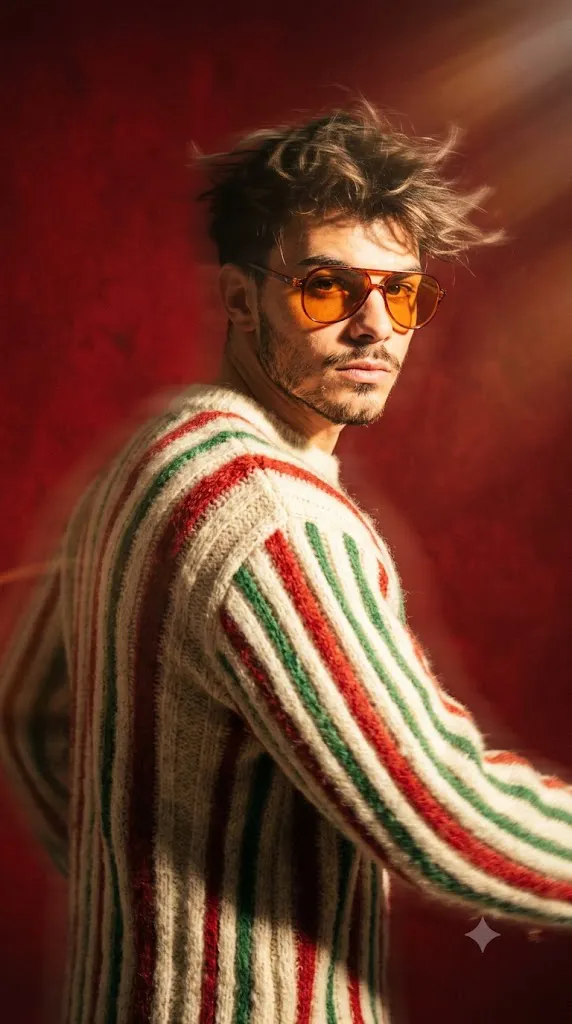
The 4K Cinematic Motion Blur Fashion Editorial Portrait style is one of the most eye-catching trends in modern AI photography. Inspired by luxury fashion campaigns, Vogue-style editorials, and cinematic magazine covers, this technique combines dynamic movement with premium fashion styling to create portraits that feel alive and full of energy. Unlike traditional still portraits, motion blur adds speed, emotion, and storytelling while keeping the subject as the visual focus.
"4K Cinematic Motion Blur Fashion Editorial Portrait Prompt"
Using the uploaded portrait as the facial identity reference, create a hyper-realistic cinematic fashion editorial portrait of a stylish man captured in a dynamic mid-turn pose. Preserve the original facial features, beard, and hairstyle while adding natural windblown movement. Dress the subject in a fuzzy ribbed knit sweater featuring vertical cream, red, and green stripes, complemented by orange-tinted retro sunglasses. Use dramatic sun-drenched lighting that creates bold highlights on the face and deep cinematic shadows across the clothing. Place the subject against a rich deep-red studio background with strong directional light. Apply realistic motion blur around the body, hair, and clothing while keeping the face crisp and expressive. Capture the image using an 85mm lens with shallow depth of field, premium Vogue-inspired editorial styling, subtle 35mm film grain, DSLR-quality sharpness, realistic fabric textures, cinematic HDR lighting, ultra-detailed skin, masterpiece quality, and 4K resolution.
A successful motion blur portrait blends crisp facial details with controlled movement in the surrounding elements. Windblown hair, flowing clothing, dramatic lighting, and directional motion lines all contribute to a sense of action without sacrificing realism. When paired with high-end fashion styling—such as textured knitwear, retro sunglasses, and bold studio backgrounds—the result resembles a professional editorial photograph captured during a live fashion shoot.
Artificial intelligence has made it possible to recreate this sophisticated look using carefully written prompts. By describing every important detail, including the pose, wardrobe, lighting, camera lens, and cinematic atmosphere, you can generate realistic editorial portraits suitable for portfolios, fashion campaigns, magazines, social media, and creative branding.
This guide explains how to use AI photo editing, the best tools for creating cinematic motion blur portraits, an example prompt, and professional editing techniques for achieving ultra-realistic results.
How To Use Photo Editing?
Photo editing is an important part of creating premium editorial portraits. AI generates the initial image, while editing software enhances the overall quality, realism, and visual impact.
Step 1: Choose a High-Resolution Reference Photo
Select a portrait with good lighting, sharp facial details, and a clear hairstyle. High-quality references improve facial consistency and realism.
Step 2: Copy a Detailed Prompt
Use a professionally written prompt that clearly describes the pose, wardrobe, lighting, background, motion effects, camera settings, and artistic style.
Step 3: Upload the Reference Image
Import the portrait into an AI image generator that supports face reference or image-to-image editing for better identity preservation.
Step 4: Generate Multiple Variations
Create several versions to compare movement, facial accuracy, lighting, and composition before selecting the strongest image.
Step 5: Refine the Best Image
Open the selected image in professional editing software to improve sharpness, remove artifacts, and strengthen the cinematic atmosphere.
Using AI together with professional editing produces portraits that closely resemble luxury fashion photography.
Tools You Can Use For Prompt Copy and Create Photo
The right tools make a significant difference in the quality of your AI-generated portraits.
ChatGPT
Useful for writing detailed prompts that include lighting, wardrobe, camera angles, motion effects, and editorial styling.
Midjourney
Excellent for creating cinematic fashion editorials with dramatic compositions, premium textures, and artistic lighting.
Flux AI
Produces realistic portraits while preserving facial identity and natural skin textures.
Stable Diffusion
Offers advanced customization through image-to-image generation, ControlNet, and prompt refinement.
GPT Image
Ideal for generating realistic editorial portraits directly from descriptive prompts with consistent visual quality.
Adobe Photoshop
Perfect for retouching skin, enhancing motion blur, sharpening details, removing distractions, and refining compositions.
Adobe Lightroom
Improves exposure, highlights, shadows, contrast, texture, and cinematic color grading for a polished editorial finish.
Canva
Helpful for designing magazine covers, posters, thumbnails, banners, and social media graphics using the completed portrait.
Combining AI generation with professional editing software helps create publication-quality results.
How To Edit Photo?
Professional editing transforms a good AI portrait into a polished magazine-quality image.
Clean the Portrait
Remove unwanted artifacts and preserve realistic facial textures without making the skin appear overly smooth.
Enhance Motion Blur
Refine the motion blur so it enhances movement while keeping the face and key details sharp.
Improve Lighting
Adjust highlights and shadows to create strong contrast that emphasizes facial structure and clothing texture.
Sharpen Key Features
Increase clarity around the eyes, beard, hair, sunglasses, and knit sweater while maintaining a natural appearance.
Refine Colors
Enhance the rich red background, warm skin tones, and clothing colors to create a balanced cinematic palette.
Add Film Texture
Apply subtle film grain to achieve a timeless editorial look without overpowering the image.
Export in 4K
Save the finished portrait at 3840 × 2160 resolution or higher with maximum quality settings for websites, print, portfolios, and social media.
Conclusion
The 4K Cinematic Motion Blur Fashion Editorial Portrait style combines luxury fashion photography with dynamic movement to create visually striking AI-generated artwork. By using a carefully crafted prompt, a high-quality reference image, and professional editing techniques, you can produce portraits that feel energetic, sophisticated, and worthy of a premium fashion magazine.
The key to success is balancing motion with clarity. Controlled blur, dramatic lighting, stylish clothing, realistic textures, and thoughtful composition all contribute to a convincing editorial image. AI handles the creative generation, while post-processing enhances realism, sharpness, and cinematic atmosphere.
As AI image generation technology continues to improve, experimenting with different motion effects, fashion styles, studio lighting setups, and creative compositions will help you develop your own signature aesthetic. With practice and attention to detail, you can consistently create high-end fashion portraits that capture movement, personality, and editorial excellence in every frame.