Introduction
In modern portrait photography, the fusion of fashion, architecture, and cinematic storytelling has created an entirely new visual genre. One of the most striking examples of this trend is the RENO Frame: Cinematic Architectural Streetwear Portrait. This style combines premium studio photography, minimalist streetwear fashion, bold architectural elements, and editorial-level lighting to produce images that feel contemporary, luxurious, and visually powerful.
"RENO Frame Cinematic Architectural Streetwear Portrait Prompt"
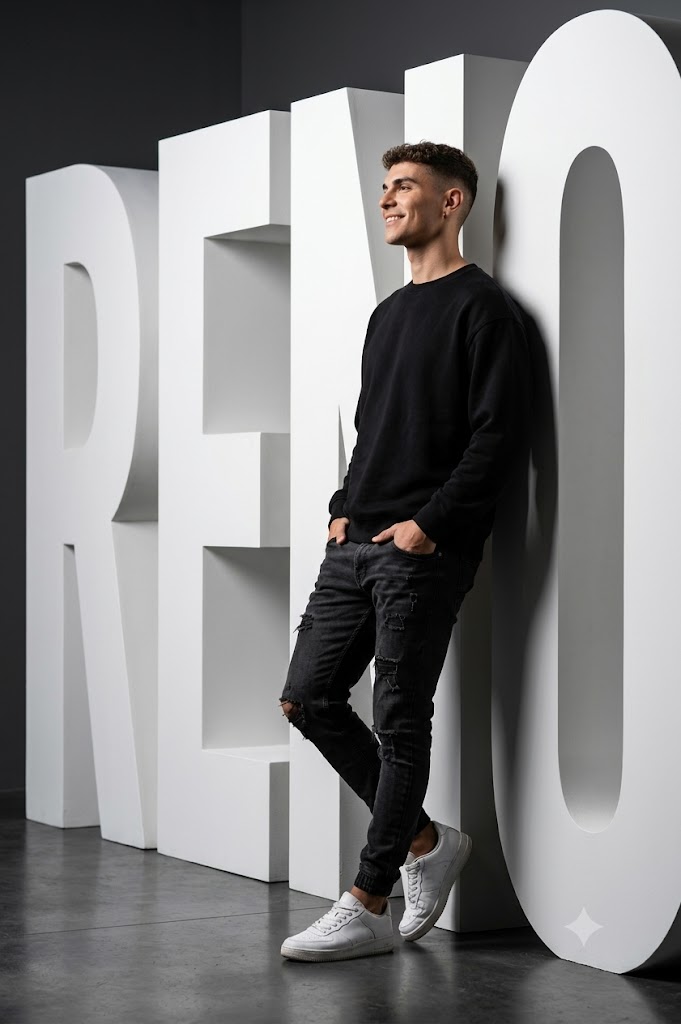
1. Subject and Identity Subject: A man, approximately 29 years old, in a relaxed yet confident posture. Identity Source: [Use the uploaded face image as the facial reference, maintaining 100% facial detail and likeness.] Pose: Full body shot from the side (profile), leaning comfortably against the large white sculpture. Most of the weight is resting on one leg. Both hands comfortably in trouser pockets, creating a natural and effortless look. Expression: Poignant, thoughtful, and peaceful. The head is slightly tilted as the subject peers through the frame.2. Wardrobe and Style Outfit: Comfortable, oversized black round-neck sweatshirt (no logo, soft cotton fabric) paired with ripped jeans. Footwear: White sneakers with visible shoelaces and distinctive, sculpted soles. Accessories: Earring piercing. Style: Monochrome, minimal, and contemporary streetwear/casual fashion. 3. Setting and Environment Location: Modern, high-end studio environment. Background: Clean and simple dark grey tones. Prop/Sculpture: A large, 190 cm tall white sculpture spelling the word "RENO" (in a bold, architectural font). The subject is comfortably leaning against this sculpture. 4. Technical and Aesthetic Details Angle: Low-angle shot (worm's-eye view) to emphasise height, presence, and the grandeur of the "RENO" sculpture in the background. Composition: Cinematic and natural proportions. The framing resembles that of a classic portrait lens, with an approximate focal length of 85 mm. Lighting: Controllable studio lighting. The lighting should strongly and constantly highlight the subject's figure, while casting a soft, directional shadow on the large white sculptural letters behind the subject. Overall Mood/Vibe: Cinematic, Editorial, and Modern. Combining casual streetwear with distinctive architectural characters. Realism: Ultra-realistic, hyper-detailed photography (100% realism).
The concept centers around a subject confidently interacting with a large sculptural installation—in this case, an oversized architectural "RENO" structure. The clean geometric shapes of the sculpture create a strong visual framework, while the relaxed pose and casual wardrobe add authenticity and personality. Together, these elements create a portrait that feels both artistic and fashion-forward.
What makes this style particularly appealing is its balance between simplicity and sophistication. A monochrome wardrobe, carefully controlled studio lighting, and a modern editorial composition work together to create a timeless image that could easily appear in a high-end fashion magazine or luxury advertising campaign.
Whether you are an AI artist, photographer, content creator, or digital editor, mastering this portrait style can elevate your visual projects and help create professional-grade imagery with cinematic appeal.
How To Use Photo Editing?
Creating a strong portrait does not end when the image is generated. Professional editing plays a major role in enhancing realism, refining lighting, and emphasizing architectural elements.
Step 1: Generate the Base Portrait
Start by creating the image using your preferred AI image generator or camera setup. Focus on obtaining:
- Accurate facial details
- Natural body proportions
- Proper interaction with the sculpture
- Strong lighting direction
- Clean composition
Generate multiple versions and select the most realistic result.
Step 2: Improve Facial Realism
Editorial portraits demand realistic facial rendering.
Refine:
- Skin texture
- Eye details
- Hair strands
- Facial contours
- Natural shadows
Avoid excessive skin smoothing, as authentic textures contribute significantly to realism.
Step 3: Enhance Architectural Elements
The "RENO" sculpture should remain a dominant visual feature.
Increase:
- Edge definition
- Surface texture
- Contrast
- Dimensionality
The sculpture should appear solid, premium, and realistically integrated into the scene.
Step 4: Refine Lighting
Studio lighting is one of the most important aspects of this portrait style.
Ensure:
- Directional lighting remains consistent
- Subject highlights appear natural
- Shadows are soft but defined
- Depth is clearly visible
Proper lighting enhances both fashion and architecture simultaneously.
Step 5: Color Grading
Although the wardrobe remains mostly monochromatic, subtle color grading helps establish mood.
Use:
- Cool neutral tones
- Deep shadows
- Controlled highlights
- Balanced contrast
The goal is a sophisticated editorial appearance.
Tools You Can Use For Prompt Copy and Create Photo
Various tools can help create and refine architectural streetwear portraits.
ChatGPT
ChatGPT is an excellent resource for developing highly detailed prompts.
Benefits include:
- Prompt generation
- Scene creation
- Lighting descriptions
- Camera settings suggestions
- Styling concepts
Detailed prompts often result in significantly better outputs.
Midjourney
Midjourney excels at producing fashion-focused and artistic portraits.
Advantages:
- Strong composition
- Cinematic atmosphere
- High-detail rendering
- Editorial aesthetics
It is particularly useful for architectural portrait concepts.
Leonardo AI
Leonardo AI offers advanced control over realism and styling.
Features:
- Detailed character rendering
- High-resolution outputs
- Realistic textures
- Customizable environments
Adobe Firefly
Adobe Firefly provides user-friendly image generation and editing tools.
Benefits:
- Simple workflow
- Fast image generation
- Professional integration
- Realistic visual quality
Stable Diffusion
Stable Diffusion is ideal for advanced users who want maximum customization.
Features:
- Open-source flexibility
- Model customization
- Detailed prompt control
- High-quality outputs
- Professional Photo Editing Software
Adobe Photoshop
Photoshop remains the industry standard for portrait retouching.
Useful for:
- Skin retouching
- Background cleanup
- Shadow enhancement
- Sculpture refinement
- Color grading
Adobe Lightroom
Lightroom excels at exposure correction and cinematic color grading.
Features:
- Contrast adjustments
- White balance control
- Highlight recovery
- Professional presets
Snapseed
A powerful mobile editing application.
Advantages:
- Free access
- Selective editing tools
- Portrait enhancement
- Fast workflow
Canva
Perfect for beginners who need quick adjustments.
Features:
- Easy filters
- Color correction
- Background modifications
- Social media export
How To Edit Photo?
Professional editing transforms a good portrait into a magazine-quality masterpiece.
1. Correct Exposure
Begin by balancing overall exposure.
Adjust:
- Brightness
- Contrast
- Highlights
- Shadows
Balanced exposure ensures visual clarity and depth.
2. Improve Skin Texture
Authentic editorial portraits preserve natural skin details.
Maintain:
- Skin pores
- Facial texture
- Natural imperfections
Avoid over-processing.
3. Enhance Clothing Details
Streetwear fashion relies heavily on texture.
Increase clarity on:
- Sweatshirt fabric
- Denim texture
- Sneaker details
- Fabric folds
These details add realism.
4. Strengthen Architectural Presence
The sculpture should feel substantial and realistic.
Refine:
- Edges
- Shadows
- Surface lighting
- Perspective accuracy
This improves visual impact.
5. Add Cinematic Depth
Use depth-of-field adjustments to separate the subject from the background.
Keep:
- Subject sharp
- Background soft
- Sculpture slightly emphasized
This creates a premium editorial look.
6. Refine Shadow Placement
Studio lighting should create believable shadows.
Ensure shadows:
- Follow light direction
- Match object placement
- Enhance depth
Proper shadow placement dramatically improves realism.
7. Apply Editorial Color Grading
Modern fashion portraits benefit from controlled color palettes.
Use:
- Neutral blacks
- Soft gray backgrounds
- Balanced skin tones
- Gentle contrast
Avoid oversaturated colors.
8. Final Sharpening
Apply selective sharpening to:
- Eyes
- Hair
- Clothing textures
- Sculpture edges
Avoid sharpening the entire image uniformly.
Conclusion
The RENO Frame: Cinematic Architectural Streetwear Portrait Prompt represents the perfect blend of contemporary fashion, architectural design, and cinematic photography. By combining a relaxed streetwear aesthetic with bold sculptural elements and professional studio lighting, this portrait style delivers a powerful visual statement that feels modern, luxurious, and editorial.
Success in this style depends on attention to realism, thoughtful composition, controlled lighting, and high-quality post-processing. Every element—from the oversized black sweatshirt to the architectural "RENO" sculpture—contributes to a balanced visual narrative that highlights confidence, individuality, and contemporary design.
Whether you're creating content for social media, fashion campaigns, personal branding, or digital art portfolios, this portrait style offers a sophisticated and memorable approach to modern portrait photography. With the right prompt, careful editing, and a strong understanding of cinematic aesthetics, you can create stunning architectural streetwear portraits that stand out with professional quality and timeless appeal.