Introduction
Fashion photography has evolved far beyond traditional studio portraits. Today, some of the most compelling editorial images combine luxury fashion, atmospheric storytelling, cinematic color grading, and authentic environments. One aesthetic that has gained immense popularity in fashion campaigns and AI-generated photography is the Cinematic Countryside G-Class Editorial Portrait.
"Cinematic Countryside G-Class Editorial Portrait Prompt"
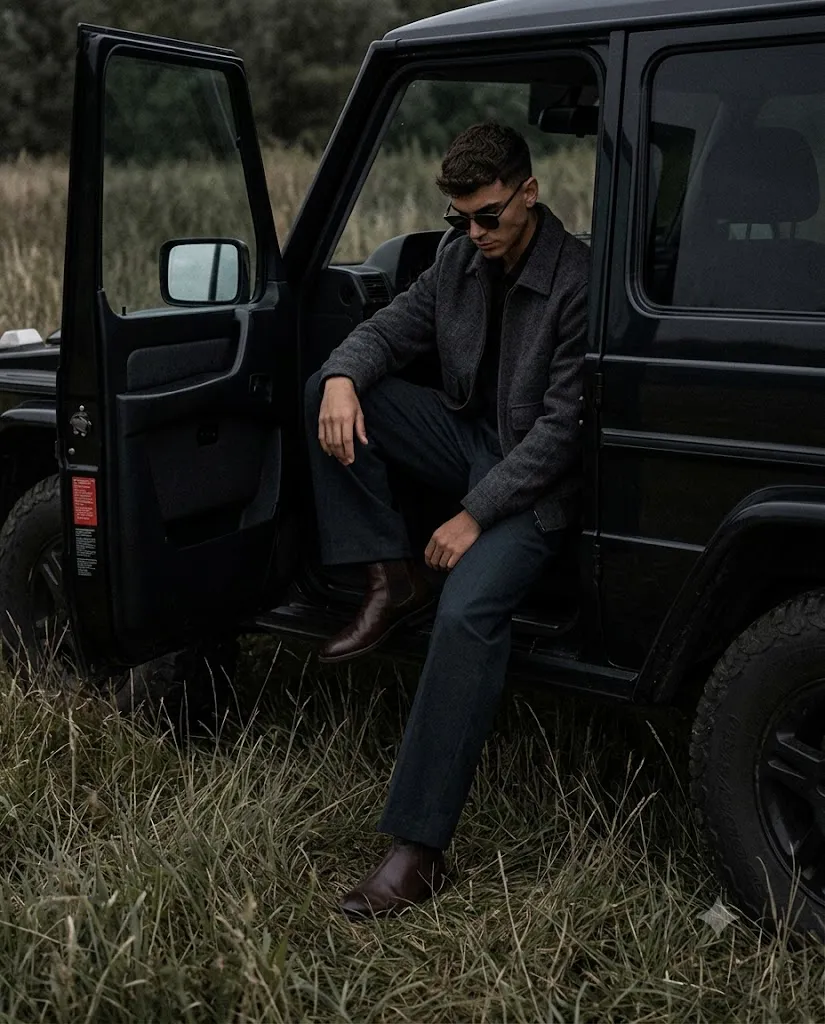
Create an ultra-realistic cinematic fashion editorial portrait of a man seated inside the open driver-side doorway of a black vintage luxury SUV inspired by a classic Mercedes G-Class. The SUV is parked in a quiet countryside field with tall dry grass and a pale overcast sky. The subject wears a charcoal textured jacket, black shirt, wide-leg dark trousers, black sunglasses, and dark leather boots. Relaxed asymmetrical pose, partially hidden within the dark interior. Soft cloudy daylight, muted color palette, deep shadows, low saturation, documentary-style camera angle, premium fashion editorial aesthetic, realistic skin texture, subtle film grain, luxury countryside atmosphere, 35mm lens, 8K quality.
This style blends rugged countryside landscapes with understated luxury. Instead of relying on bright commercial lighting and polished poses, it focuses on mood, restraint, and emotional depth. The subject appears naturally integrated into the environment, creating a visual narrative that feels authentic rather than staged.
A vintage luxury SUV inspired by the classic Mercedes G-Class serves as a powerful visual anchor within the composition. The vehicle symbolizes timeless wealth, durability, and old-money sophistication. Unlike modern luxury advertisements that emphasize glamour and perfection, this editorial approach embraces imperfections, muted tones, and relaxed body language.
The countryside setting contributes significantly to the atmosphere. Tall dry grass, pale overcast skies, and expansive open fields create a feeling of solitude and introspection. The environment becomes an extension of the subject's personality, reinforcing themes of quiet confidence and understated masculinity.
What makes this style particularly appealing is its cinematic quality. Deep shadows, soft daylight, muted color palettes, and documentary-inspired camera angles create an image that feels like a frame from a high-end film rather than a traditional fashion shoot.
With modern AI image generation platforms and professional editing tools, creators can now produce stunning countryside editorial portraits without requiring access to luxury vehicles or remote locations. A carefully written prompt combined with thoughtful post-processing can generate images that rival premium fashion magazines and commercial campaigns.
This guide explains how to use photo editing effectively, which tools can help create this aesthetic, and how to refine your images into a sophisticated editorial masterpiece.
How To Use Photo Editing?
Photo editing is essential when creating cinematic editorial portraits because it shapes the mood and visual identity of the image.
The first step is exposure control. Unlike commercial fashion photography, this style intentionally retains deep shadows and subdued highlights. The goal is to preserve mystery and atmosphere rather than reveal every detail.
Color grading plays a major role in defining the aesthetic. Countryside editorial portraits often feature desaturated tones, muted greens, faded browns, charcoal blacks, and soft gray skies. Reducing saturation helps create a timeless cinematic appearance.
Shadow management is equally important. Instead of lifting dark areas excessively, allow portions of the SUV interior and clothing to remain shadowed. This creates depth and reinforces the moody visual language.
Skin retouching should remain minimal. Preserve natural pores, texture, and facial features to maintain realism. Over-editing can undermine the documentary-inspired authenticity of the portrait.
Vehicle details should also receive attention during editing. Chrome accents, tire textures, reflections, and subtle paint highlights should remain visible without becoming overly glossy.
Background adjustments can further enhance the cinematic feel. Slightly softening distant grass and sky helps direct focus toward the subject while preserving environmental context.
Finally, introducing subtle film grain can create a premium editorial finish that feels reminiscent of luxury fashion magazines and analog photography.
Tools You Can Use For Prompt Copy And Create Photo
Several AI image generators and editing applications can help create cinematic countryside editorial portraits.
AI Image Generation Tools
ChatGPT Image Generation
ChatGPT can generate highly detailed editorial photography concepts with realistic environments, fashion styling, and cinematic lighting.
Midjourney
Midjourney is widely recognized for creating artistic and visually striking fashion imagery with exceptional atmosphere.
Leonardo AI
Leonardo AI offers advanced customization and realistic rendering capabilities suitable for luxury editorial photography.
Ideogram
Ideogram provides strong prompt accuracy and excellent photorealistic image generation.
Adobe Firefly
Adobe Firefly integrates with professional creative workflows and produces commercial-quality visuals.
Photo Editing Software
Adobe Photoshop
Photoshop remains the leading tool for advanced retouching, compositing, color grading, and editorial enhancements.
Adobe Lightroom
Lightroom excels at exposure correction, tonal adjustments, and maintaining consistency across images.
Capture One
A favorite among professional photographers for color management and high-end image processing.
Snapseed
A powerful mobile editing application suitable for quick professional enhancements.
PicsArt
Popular among creators for artistic effects and social-media-ready editing.
How To Edit Photo?
Once your image has been generated, follow these editing steps to achieve a premium editorial finish.
Step 1: Import The Image
Open the image in Photoshop, Lightroom, Capture One, or another editing application.
Step 2: Adjust Exposure
Reduce highlights slightly while maintaining detail in shadows and preserving the moody atmosphere.
Step 3: Refine Color Grading
Apply muted tones and lower saturation for a cinematic countryside look.
Step 4: Preserve Shadow Depth
Avoid brightening dark areas excessively. Allow the SUV interior and clothing to retain visual weight.
Step 5: Enhance Skin Realism
Perform subtle retouching while preserving natural texture and facial detail.
Step 6: Improve Vehicle Details
Enhance reflections, chrome accents, and tire textures without creating a commercial showroom appearance.
Step 7: Balance The Environment
Adjust grass, sky, and landscape tones to create a cohesive visual palette.
Step 8: Apply Cinematic Contrast
Use gentle contrast to maintain depth while preserving soft transitions.
Step 9: Add Film Grain
Introduce fine grain for a sophisticated editorial finish.
Step 10: Export
Save the final image in high resolution. PNG format is recommended for maximum quality and detail retention.
Conclusion
The Cinematic Countryside G-Class Editorial Portrait represents a powerful fusion of fashion photography, luxury lifestyle imagery, and cinematic storytelling. Through muted colors, atmospheric lighting, rugged landscapes, and understated styling, this aesthetic creates images that feel timeless, emotional, and effortlessly sophisticated.
Modern AI image generators and editing software make it possible to recreate this premium editorial look without expensive equipment or exclusive locations. By focusing on subtle lighting, realistic textures, thoughtful composition, and restrained color grading, creators can produce imagery that rivals professional fashion campaigns.
Whether you are building a portfolio, creating social media content, developing a luxury fashion concept, or experimenting with AI-generated art, mastering this editorial style can help you create compelling visuals that communicate confidence, elegance, and quiet luxury in a truly cinematic way.